Getly
GetlyBlender Add-ons
RetargetKit
Move animation between skeletons. Automatic mapping, rest poses lined up, feet on the floor.
Product description
RetargetKit — move animation between skeletons
You have a walk cycle on a Mixamo rig and a character built on Rigify. Or a library of mocap takes and an Unreal mannequin. RetargetKit maps the bones for you, lines the two rest poses up, and bakes the performance across with the character standing on the floor.
What it solves
Retargeting in Blender means either buying a full rigging suite for the one feature you need, or hand-building constraints on twenty bones and hoping. The hard part is not copying rotations — it is that two rigs almost never share a rest pose, a size or a place in the scene. Copy the local rotation and every limb comes out twisted. Move each bone by what the source bone turned away from its own rest pose and a T-pose source leaves an A-pose target with its hands in its hips.
RetargetKit lines the target's arms and legs up with the source's first, transfers in world space, places the hips from the length of the legs and the level of the floor, and reads every pose back from Blender to check that the bones arrived. Measured on six motion-capture clips and seven target rigs, the limbs of the target point where the source's do to 0.0 degrees.
Mapping that mostly does itself
- Eleven rig families recognised — Mixamo, Unreal Mannequin, Rigify (controls, deform and metarig), Character Creator / iClone, Auto-Rig Pro (controls and deform skeleton), Daz Genesis 3 and 8, VRoid / VRM, and 3ds Max Biped. Each is mapped through one canonical skeleton, so any of them retargets to any other.
- Fingers as well as the body. Every family's hands are in the tables — thirty bones a rig, thumb to thumb, segment to segment. One checkbox turns them on, and they are transferred by the same rule as the arms.
- Anything else is matched by name. The fallback strips the prefixes, suffixes and separators every scheme sprinkles about, splits CamelCase, and keeps left and right straight — it will not quietly cross the arms.
- The mapping is always shown and always editable. Every pair is a row you can change, disable or delete, with bone-name dropdowns rather than free text so a typo cannot slip through.
Map it once
- Presets. Save a mapping, and its transfer settings, under a name — then load it onto the next take, the next file, the next import of the same character. Presets hold bone names rather than links to objects, so they follow the character across .blend files, and the folder they live in can point at a shared drive so a whole team works from the same mappings.
- Mirror Mapping. Fill the right side of the body from the left, or the left from the right, in one click. Only rows whose mirrored names exist on both rigs are added, so nothing is ever guessed onto the wrong bone.
- Check Mapping. Before a single frame is baked, the mapping is read over for crossed arms, a target bone that two source bones are both driving, names neither rig has, half-filled rows, and limbs both rigs have that nothing is transferring. A mistake in a mapping produces a result that looks plausible until you play it — this is where it gets caught.
Different rest poses, different sizes, different places
- Rest poses are lined up. T-pose onto A-pose, legs that stand apart on one rig only: the upper arm, forearm, thigh and shin of the target are lined up with the source's before the transfer, and each hand is turned so that its knuckles lie the way the source's do when the fingers of both rigs are mapped (Include Fingers, on by default). The trunk, the head and the feet keep their own rest orientation, so a foot that is flat at rest stays flat. On our clips the limbs were 18.6 to 54.6 degrees off without this, and a hand was inside the body on up to 265 frames of 300; with it, 0.0 degrees and no such frame. From the Unreal Engine 5 Mannequin (A-pose) onto a Mixamo-named T-pose character, both imported from FBX, the upper arm was 53 degrees off and the forearm 60 on every frame without it; with it, 0.0 on the bones and on the skinned mesh, the hand within 5 degrees and the palm within 5.
- The character stands on the floor. The hips are placed from the legs: height above the floor and travel are both scaled by leg length. A BVH skeleton rests with its hips at the origin; for such a source the floor is read from the animation, and the report says so. The feet come down to within 6 mm of the floor on rigs proportioned like the source and to within 28 mm on the others we measure.
- Hold Planted Feet. Optional. While the source's foot is standing — its ankle, its ball or its toe tip is near the floor and barely moving — the target's foot follows the same path from where it landed and the knee gives. The hips and the arms are not touched.
- Generated Rigify rigs, both ways. As a target the FK controls are keyed, the four limbs are switched to FK and the switch is keyed into the action; the report names each switch and the value it had, and Restore Target puts the rig back as it was. As a source the rig is read from its ORG bones, which follow whatever drives it, so IK-animated actions transfer.
- How the rigs stand in the scene does not matter. Moved, rotated about any axis, uniformly scaled, or imported the way FBX imports: the pose in the target's own space is the same to within 0.3 mm.
Details that matter
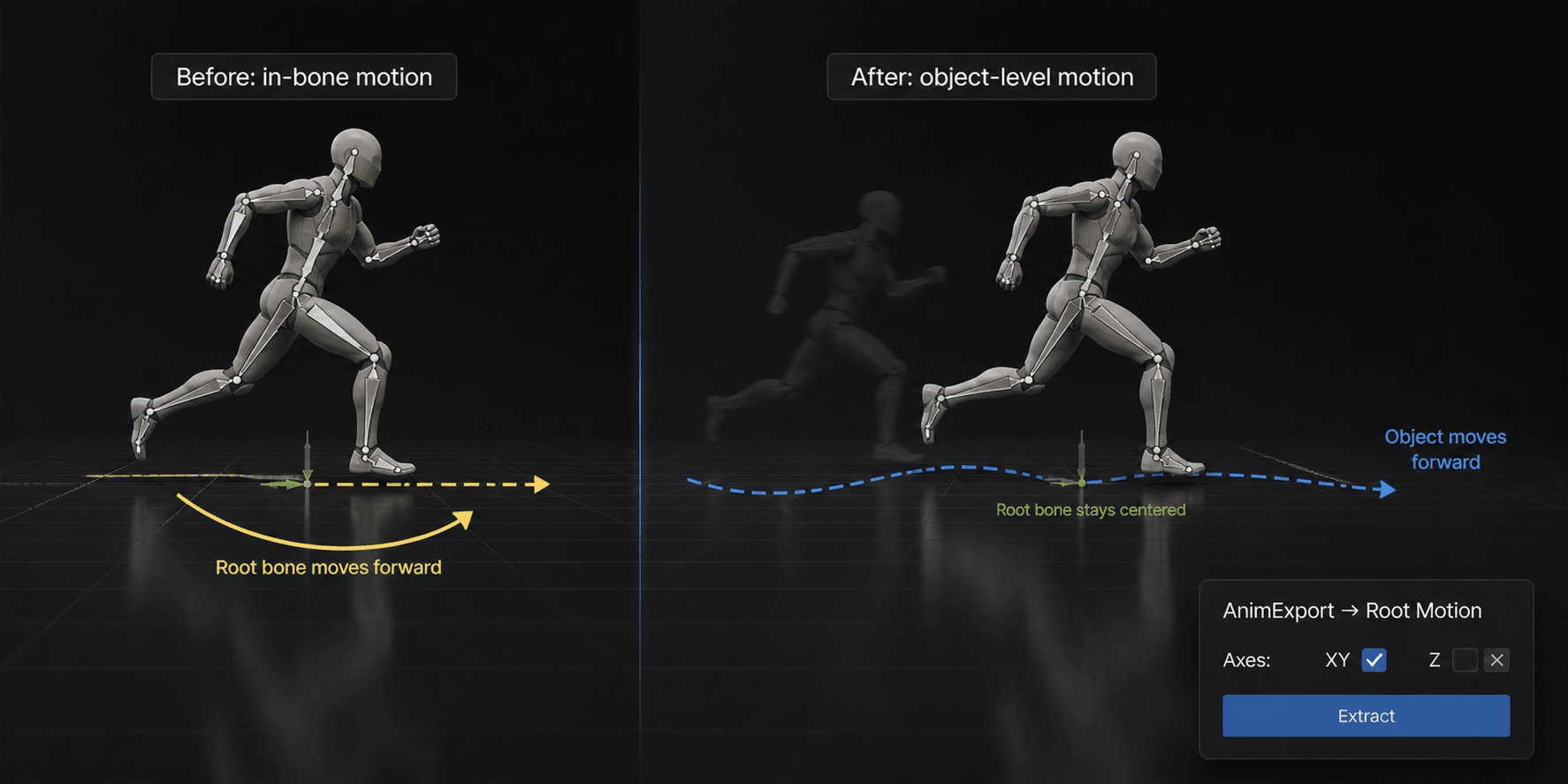
- Root motion where the engine expects it — on the rig's root bone rather than the hips when you name one, filled in automatically for Auto-Rig Pro, Unreal and Rigify. Or turn it off entirely and retarget the pose alone.
- Batch mode retargets every action of the source rig in one go and keeps every result in the file — the point of buying a mocap library.
- A report under the button. What was lined up, where the floor came from, which limbs were switched to FK, which bones a constraint held back, how far standing feet drift.
- It refuses rather than bakes nonsense. A rig in Edit Mode, in Rest Position, disabled in the viewport, in NLA tweak mode, mirrored by a negative scale, or a linked target without a library override: it stops, says why and changes nothing.
- Your animation is kept. The result is a new action; the source is left in the state you found it, and the action the target had before — made by hand or an earlier result — stays in the file. Restore Target puts the target back the way it was before the last retarget.
- Swap flips source and target, and the mapping with them.
Honest about scope
It transfers rotations plus the position of the hips. Hold Planted Feet bends the knees to keep standing feet where the source's are; it does not move the hips, and without it a character proportioned differently from the source drifts on its standing feet — by up to 83 mm on a Rigify rig in our clips, where the source's own feet slide 5 to 31 mm — and long toes can dip under the floor, by up to 41 mm on a stylized character with legs 0.6 the length of the source's. Holding the feet costs angle in the legs: typically 3.8 to 11.1 degrees on a Rigify rig and 6.1 to 17.1 on short legs, 15.1 and 19.7 on the worst single frame. Arms are not solved with IK, so hands that touch the body or each other on the source can miss on other proportions. On a generated Rigify rig the lumbar bone follows the pelvis, because none of that rig's rotation controls turns one without the other (14 to 61 degrees from the source's lower spine on our clips); the pelvis, the ribcage and the limbs are exact. A bake cannot be cancelled once it has started, and both rigs should be uniformly scaled.
Nothing is locked in
The result is an ordinary baked action. It plays, exports and edits like any other, needs nothing from this add-on once it exists, and works on a render farm.
Tested, not assumed
More than 400 automated checks run in a clean Blender against every release, on Blender 4.2.9 and 5.2.2. The source is real motion capture — six CMU clips imported with Blender's own BVH importer — and the transfer is driven through the panel's buttons. The targets differ in rest pose, proportions, bone roll, naming, scale and placement: a plain humanoid, Mixamo-named rigs, an FBX-style import, the Rigify metarig, a generated Rigify rig and a stylized character. The measures are angles and millimetres, and every fix has a check that turns red without it.
Requirements
Blender 4.2 LTS or newer. Tested live on Blender 4.2.9 and 5.2.2 on macOS (Apple Silicon) and Windows. Pure Python with no platform-specific code, so Linux is expected to work, but this release was not run on it. No dependencies, works offline.
v1.3.0 — The character stands on the floor. With a BVH source — a skeleton that rests with its hips at the origin and is animated up to standing height — the target hung in the air: measured on six CMU motion-capture clips, the feet of the target rigs were 0.72 to 1.60 m above the floor. The hips are now placed from the legs: their height above the floor and their travel are scaled by leg length, and the source's floor is read from the animation when its rest pose stands somewhere else. Same clips, same rigs: the feet come down to within 6 mm of the floor on rigs proportioned like the source and to within 28 mm on a Rigify rig and on a stylized one with short legs. A source whose rest pose does stand on the floor keeps that floor: a clip that plays on a platform stays on the platform, and the report says how high. Source Floor in Options overrides the choice, and the report says which floor was used and at what height. Rest poses are lined up. A bone was moved by whatever the source bone had turned away from its own rest pose, so a T-pose source on an A-pose target, or a mocap skeleton that rests with its legs apart, put that difference into every frame: 18.6 to 54.6 degrees between a limb of the target and the same limb of the source, and up to 265 frames of 300 with a hand inside the body. The upper arm, the forearm, the thigh and the shin are now lined up with the source's before the transfer; a hand is turned so that its knuckles lie the way the source's do when the fingers of both rigs are mapped (Include Fingers, on by default), and goes with the forearm otherwise, and the forearm is rolled so that neither the elbow nor the wrist twists more than it must; the trunk, the head, the shoulders and the feet keep their own rest orientation. Measured after: 0.0 degrees on every limb and no frame with a hand in the body. From the Unreal Engine 5 Mannequin, which rests in an A-pose, onto a Mixamo-named character in a T-pose, both imported from FBX: 53 degrees at the upper arm and 60 at the forearm on every frame without this, 0.0 with it, on the bones and on the skinned mesh alike, with the hand within 5 degrees and the palm within 5. Line Up Rest Poses in Options turns it off. Standing feet drift less, and can be held. Travel was scaled by the height of the whole rig rather than by the legs, and a standing foot of the target slid 22 to 263 mm where the source's slid 5 to 31. Scaled by leg length it is 6 to 39 mm on rigs proportioned like the source, 5 to 30 mm on a stylized rig with short legs and 7 to 83 mm on a Rigify rig. The new Hold Planted Feet option holds a foot while the source's foot is standing and lets the knee give: the target's ankle then follows the path of the source's ankle, scaled like the stride, to within 2 mm on the walk we measure, with the lowest point of the foot at the source's height above its floor to within 1 mm on 95% of the held frames. The knee bends about its own hinge and never the other way, and a hold is taken up and let go gradually, by no more than 5% of the fast speed of the feet in the clip per frame: on our walk, which is sampled 120 times a second, transferred onto a character proportioned like the source, the ankle moves at most 1.9 mm a frame faster with the option on than with it off. On the six clips the standing feet of a Rigify rig then travel 7 to 40 mm instead of 7 to 83. The price is paid in the angles of the legs, and it depends on how the target's legs compare with the source's. Over a clip the thigh and the shin typically end up 2 to 17 degrees from the source's (the 95th percentile), and 10 to 20 on the worst single frame — measured on five rigs whose legs run from 0.6 to 1.1 times those of a common humanoid and on a generated Rigify rig. It is off by default; when standing feet drift by more than 3% of a leg length the report says by how much. Generated Rigify rigs work, as targets and as sources. As a target nothing reached the mesh: the limbs stayed in IK and the pelvis control was not recognised, so the limbs were 65 to 146 degrees off and the character did not travel. The four limbs are now switched to FK and the switch is keyed into the action, the pelvis is carried by torso, and the lower spine control, which on this rig swings the pelvis, is left alone. Limbs after: 0.0 degrees. The report names every switch it changed and the value it had, and the new Restore Target button puts the target back the way it was before the retarget — its action (even if renamed since) and the slot of it the target played, its IK/FK switches and the pose of the keyed bones — to 0.0 mm on the rig we measure. As a source a generated rig is read from its ORG bones, so an action animated with IK controls transfers; it was read from FK controls that had never moved, 42 to 165 degrees off. The result does not depend on how the rigs stand in the scene. A source rotated by 90 degrees gave a pose 3.6 m off. The turn between the two rigs is now taken out before the transfer. Moved, rotated about any axis, uniformly scaled, laid on its side, or imported the way FBX imports (Y-up bones, object rotated 90 degrees and scaled 0.01): the pose in the target's own space is the same to within 0.3 mm. A rig scaled unevenly is transferred with a warning. The rest poses are read on the first frame that is baked, so a source whose object is itself animated gives the same result whichever frame the scene stands on. The action the target had is kept in the file, All Actions keeps every result, and a rig that cannot be read or keyed is refused in words instead of being baked as it stands.
v1.2.2 — Root motion can be keyed onto the rig's root bone instead of the hips, which is what a game engine reads and what an Auto-Rig Pro rig expects: Auto-Map fills the field in for the rig it detects, movement along the ground goes to the root and the vertical bob stays on the hips. Fixed a fault that left the hips unmapped on rigs outside the preset tables, where the character was posed correctly but never travelled. The Auto-Rig Pro deform skeleton is now a rig family of its own.
v1.2.1 — Auto-mapping understands mocap skeletons that name the joint rather than the limb: elbow, wrist, knee, ankle. A Move AI skeleton went from 5 of 18 bones mapped to 18 of 18.
v1.2.0 — Auto-mapping now pairs bones that carry the same name on both rigs before it starts guessing. On a custom skeleton — numbered spine segments, long arm and leg chains, twist bones — the name classifier collapsed every chain to a single class and kept one bone from each: a 62-bone rig produced 10 pairs, and the artist mapped the other 52 by hand. Measured after the change: 62 of 62, and 240 frames retargeted in 1.7 s. Recognition of Mixamo, Rigify and the other known schemes is unchanged.
What you get
2 files · 116.98 KB
- retarget_kit_v1_3_0.zipZIP · 87.81 KB
- retarget_kit_v1_2_2.zipZIP · 29.17 KB
Blender Add-ons
RetargetKit
Move animation between skeletons. Automatic mapping, rest poses lined up, feet on the floor.
Tags
Frequently asked questions
Do I get access instantly?
Yes. This is a digital product - you can download it right after checkout, straight from your library.
Can I use it for commercial projects?
License terms are set by the seller. Check the product description before you buy - it states any limits on personal, commercial or client use.
What's your refund policy?
You can request a refund within 30 days. If something isn't right, request it from your order and the Getly team reviews it.
What file formats and sizes will I get?
You'll download 2 files - ZIP - 116.98 KB in total.
Do I get free updates?
Yes - when the seller ships a new version, you can re-download the latest files from your library at no extra cost. Check the changelog for recent updates.
Price
$9.99