Getly
GetlyBlender Add-ons
RigStation — Repair Someone Else's Rig and Prove the Deform Survived
Six repair groups for a rig you did not build — names, symmetry, constraints, drivers, deform flags, visibility — and after every one of them a number in millimetres saying whether your character still deforms the same.
or $24.75 x 4 installments
Product Description
Someone else's rig, made workable — and proven
A rig arrives from a freelancer, a marketplace or the animator who left. Before you can use it, it needs work: names brought to your project's scheme, constraints pointing at bones that no longer exist, drivers whose source object was deleted, bones marked as deforming that no mesh is weighted to, bones nobody can select because every collection they live in is hidden.
Doing that by hand is slow. Doing it blind is worse — you find out whether the character still deforms the way it did only when you play the shot.
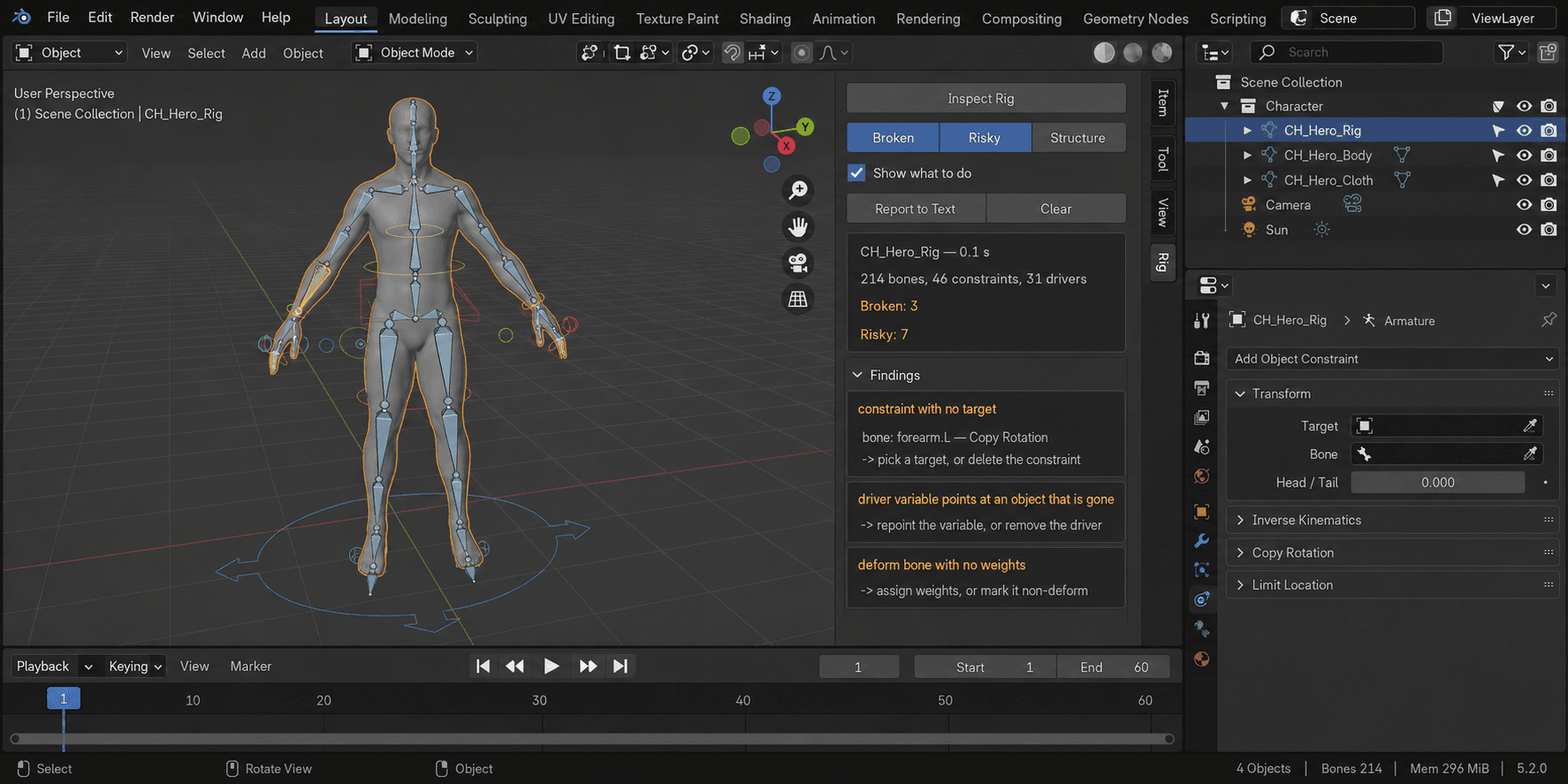
RigStation repairs the rig and then measures what the repairs did to the character, in millimetres. Zero means the rig is cleaner and the deformation is untouched. Not zero means it names the vertex, the pose and the vertex group responsible.
Six groups of repairs
- Names — brought to Mixamo, Unreal, Unity, Rigify or your own mask, with every reference following: vertex groups, constraint targets, driver variables, keyframes, parents.
- Symmetry — bones that exist on one side only, and pairs that drifted apart, are named.
- Constraints — dead ones removed, the ones whose target is found again reconnected.
- Drivers — the same, including drivers living on shape keys, where facial rigs keep them.
- Deform flags — a bone that deforms nothing either stops claiming to, or gets an empty group for you to paint into. Your choice; weights are never painted for you.
- Visibility — bones hidden by their collections, bones locked on every channel, custom shapes that are in the file but in no scene.
The proof
Before anything is written, RigStation remembers where every vertex of the evaluated mesh sits across a range of poses. After the repairs it compares, and prints two numbers from one and the same measurement.
On a rigged character of 19 bones and 1 932 vertices with three defects planted on purpose: the audit found 3 of 3 and not one extra; the repairs applied three; the deform moved 0.0000 mm against a tolerance of 0.0100 mm that you set. On a healthy rig the audit finds nothing and says so, instead of showing an empty panel.
The undo put back 3 of 3 — verified by comparing the whole rig before and after, not by counting attempts. Removed constraints are re-created with their targets, their influence and their place in the stack. The snapshot lives inside the blend file, so you can repair today and undo tomorrow.
Why the numbers are trustworthy
47 automated checks, zero problems, on Blender 4.2.9, 5.1.0, 5.2.0, 5.2.1 and 5.2.2. Ten deliberate breakages of the add-on's own logic were introduced one at a time, and the checks caught every one. A suite that cannot fail proves nothing.
Two of those checks exist because they caught real mistakes during development: a character deformed by two armatures, where taking "the first armature modifier" reports zero movement while the skin moves hundreds of millimetres; and measuring at a scene scale other than one, where dropping the unit conversion turns a real error into a comfortable small number.
What it does not do
- It does not build rigs and does not paint weights.
- It does not retarget animation.
- It does not decide for you: a circle of constraints and a driver that reads its own result are named and handed back.
- It does not touch linked data, and says so before it starts.
- It does not create a missing mirror bone — that changes the skeleton, and it is your call.
Beyond the open file
A folder of blend files can be checked in one run, each in its own background Blender, leaving your open scene untouched. The report is a single self-contained file with no external links, and the run returns a clear verdict for a pipeline: clean, blocking, or not checked — the last one kept separate on purpose, because a gate that treats silence as success will one day pass the delivery it was built to stop.
Blender 4.2 and newer. Sidebar tab: Rig Fix.
What you get
1 file · 90.4 KB
- rig_station_v1_0_0.zipZIP · 90.4 KB
Blender Add-ons
RigStation — Repair Someone Else's Rig and Prove the Deform Survived
Six repair groups for a rig you did not build — names, symmetry, constraints, drivers, deform flags, visibility — and after every one of them a number in millimetres saying whether your character still deforms the same.
or $24.75 x 4 installments
Tags
Frequently asked questions
Do I get access instantly?
Yes. This is a digital product - you can download it right after checkout, straight from your library.
Can I use it for commercial projects?
Licence terms are set by the seller. Check the product description before you buy - it states any limits on personal, commercial or client use.
What's your refund policy?
You're covered by a 30-day money-back guarantee. If something isn't right, request a refund from your order and the Getly team reviews it.
What file formats and sizes will I get?
You'll download 1 file - ZIP - 90.4 KB in total.
Do I get free updates?
Yes - when the seller ships a new version, you can re-download the latest files from your library at no extra cost. Check the changelog for recent updates.
Price
$99.00