Getly
Getly
By the end of this guide, you can write summarisation prompts with a clear length target, a defined audience, and a check for costly omissions. You can also test a summary against the source before you publish it, send it to a buyer, or turn it into a product description.
1. Decide what the summary must help someone do
A summary needs a job before it needs a word count. A buyer may need to decide whether a digital product fits a project. A creator may need to turn a long tutorial into a short sales page, lesson recap, or support note. Each job changes the details the prompt should protect.
Write the intended action in one sentence. For example: “Help a first-time buyer decide if this spreadsheet template suits a small online shop.” That sentence gives the summariser a filter. It should preserve the product’s purpose, required tools, skill level, and limits. It can drop background stories and repeated examples.
Define the reader with practical details. “Beginners” gives weak guidance on its own. “A first-time Etsy seller who knows basic spreadsheets and has 10 minutes to compare two templates” gives the prompt a usable audience model.
Name the reader
Describe the reader’s skill, situation, and immediate decision.
Set the action
State what the reader should understand, choose, or do after reading.
Choose the detail filter
Keep details that support the action and remove details that do not.
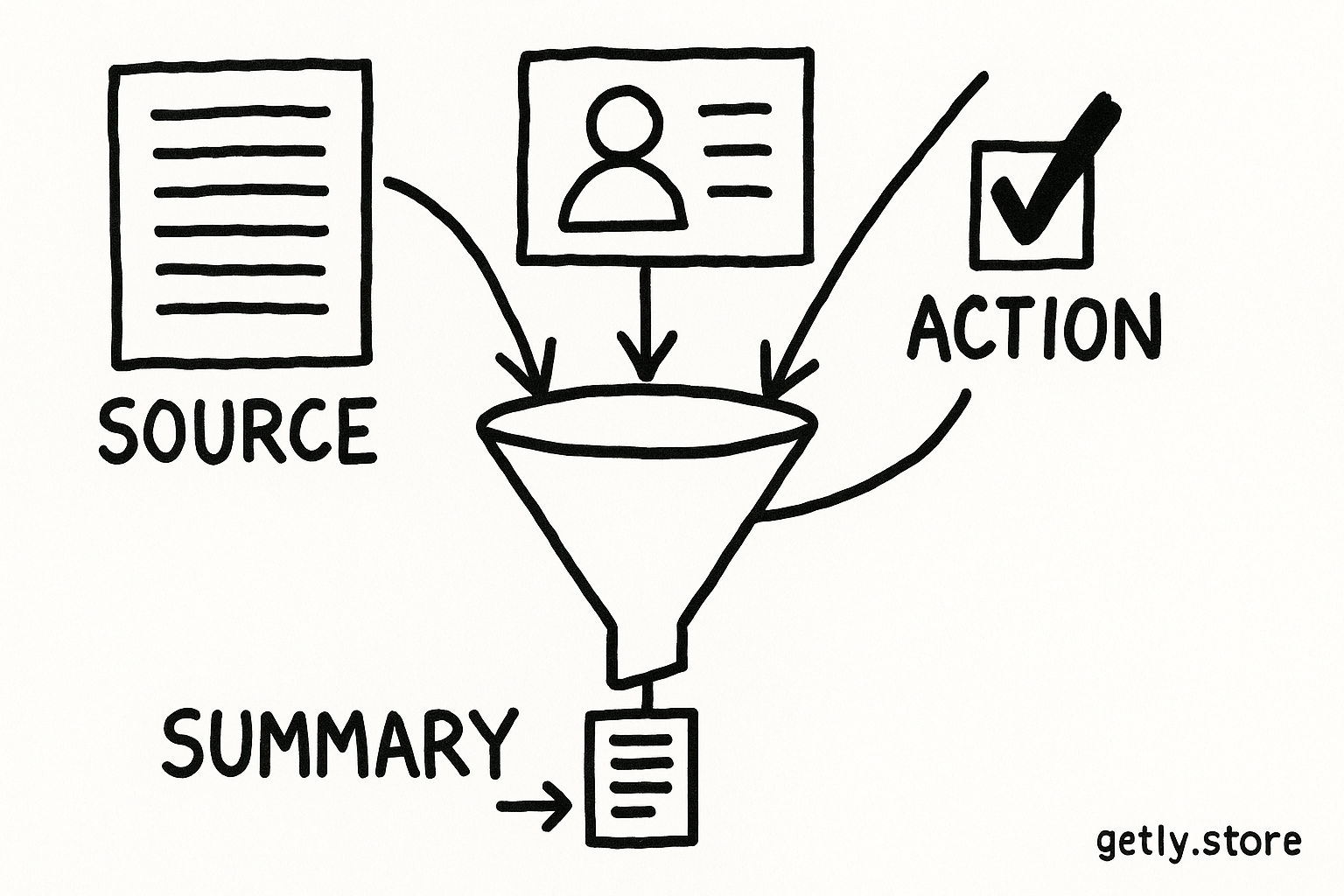
Use this prompt foundation:
“Summarise this material for [specific audience] so they can [specific action]. Preserve [essential details]. Remove [low-value material]. Use [tone and format].”
2. Set a length target that matches the job
Word counts work best when you connect them to a use case. A summary for a product card needs fewer details than a lesson recap. A fixed number also gives you a way to spot drift. If you request “brief,” the result may run to 80 words or 800.
Use a range when the source varies in density. Ask for 80 to 120 words for a compact overview, 180 to 250 words for a decision summary, or 400 to 600 words for a structured lesson recap. These ranges describe useful starting points, not universal rules.
| Use case | Useful target | Details to protect |
|---|---|---|
| Product overview | 60 to 100 words | Purpose, format, audience, limits |
| Buyer decision summary | 150 to 250 words | Benefits, requirements, drawbacks, next step |
| Lesson or guide recap | 300 to 500 words | Sequence, terms, examples, cautions |
| Executive briefing | 200 to 350 words | Decision, evidence, risk, owner |
Specify the format alongside the count. A 200-word paragraph may hide the main points. Ask for a two-sentence overview followed by four bullets, or ask for headings with one paragraph under each. The structure helps the reader scan and helps you check coverage.
Choose a tighter target when the reader faces a quick decision. Choose a wider target when the reader needs a process, qualification, or warning. Ask for a range rather than padding when the source contains uneven sections.
3. Tell the prompt what to keep
Length alone cannot protect meaning. Add a retention list that names the details a short summary must carry forward. Use concrete categories instead of “keep the important parts.”
For a digital product, your list might include:
- What the buyer receives, such as templates, videos, prompts, or files.
- Who can use it and which tools, skills, or subscriptions it requires.
- The main result, the workflow, and the time or effort involved.
- Limits, exclusions, licensing terms, or compatibility details.
- A specific next action, such as comparing options or downloading a checklist.
Rank the list when some losses cost more than others. Mark each item as critical, useful, or optional. The summariser should preserve every critical item, include useful items when space allows, and remove optional items first.
Numbers deserve special protection. Tell the prompt to preserve prices, quantities, durations, thresholds, dates, measurements, and named tools. A summary that changes “three revisions” to “unlimited revisions” changes the offer. A summary that drops a “requires a paid plugin” warning can mislead a buyer.
Use a loss instruction that explains the consequence:
“Do not drop requirements, restrictions, quantities, time estimates, safety cautions, or claims that affect the reader’s decision. If the target length cannot fit all critical details, shorten examples and background first.”
Do
- List the facts that affect a purchase or action.
- Protect numbers, conditions, and exceptions.
- Tell the summary where to spend its limited space.
Don't
- Ask for “the most important points” without defining importance.
- Let polished wording replace a missing limitation.
- Count repeated benefits as separate details.
4. Shape the output for the audience
Audience instructions should change vocabulary, order, and explanation depth. A beginner may need a short definition of “commercial license.” An experienced designer may need the license scope, file formats, and resale restriction without a basic definition.
Give the prompt four kinds of direction:
- Knowledge level: name the terms the reader understands and the terms you must explain.
- Tone: choose plain, technical, warm, neutral, or sales-focused language.
- Order: put the decision, result, requirements, or process first.
- Format: choose bullets, headings, a comparison table, or a short paragraph.
Ask for plain language when the reader needs speed and confidence. That does not mean removing precision. Replace “facilitates content repurposing” with “helps you turn one long video into short posts.” Keep the exact limitation if the product only supports certain file types or platforms.
Separate summary from recommendation. A summary reports what the material says. A recommendation tells the reader what to choose. If you want both, label them as separate sections and ask the recommendation to use only evidence in the summary.
5. Add a loss check and a fact check
A good prompt asks for a second pass after the first draft. The second pass should inspect meaning, not polish. Ask the summariser to compare the draft with the source and report each critical item as present, missing, distorted, or unclear.
Use a compact audit table:
| Check | Question | Action if it fails |
|---|---|---|
| Coverage | Did the summary include every critical item? | Add the missing item or cut an optional detail. |
| Accuracy | Did any number, condition, or claim change? | Replace the sentence with source-supported wording. |
| Audience fit | Can the intended reader understand the terms? | Define, simplify, or reorder the explanation. |
| Length | Does the draft meet the requested range? | Cut repetition before cutting requirements. |
Ask the audit to quote the summary sentence that covers each critical item. That small requirement exposes vague coverage. “Includes licensing” tells you little. “The buyer may use the files for one personal project but cannot resell them” gives you a sentence you can inspect.
Run a loss check after every major edit. A shorter rewrite can remove a qualification that the first draft handled correctly. Keep a short “must survive” list beside the draft so you can check changes without rereading the entire source each time.
6. Assemble and test the prompt
Combine the decisions into one instruction that a collaborator can reuse. This example targets a digital product description:
“Summarise the product details below for a first-time online shop owner who wants to decide if the template fits their workflow. Write 120 to 160 words. Start with a two-sentence overview, then use five bullets. Preserve the product format, included files, required tools, skill level, main outcome, license limits, and any time estimate. Keep every number and condition accurate. Remove repeated benefits, background stories, and decorative language. Use plain, neutral wording. After the summary, audit it in a table with columns for critical item, summary evidence, and status. Mark each item present, missing, distorted, or unclear.”
Test the prompt with a short source and a dense source. The short source checks whether the instruction creates needless repetition. The dense source checks whether the length target forces the summary to drop a requirement. Adjust the retention list before you adjust the audience or tone. Missing decision-critical information creates a larger problem than an imperfect style.
Save successful prompts with the job they serve. A “buyer comparison summary” prompt should not quietly become a “lesson recap” prompt. Keep the audience, word range, format, retention list, and audit criteria together so another creator can reuse the workflow.
Common mistakes to fix
- Using a vague length instruction. Replace “make it short” with a word range and output format.
- Defining the audience by age alone. Add skill, situation, goal, and decision pressure.
- Protecting benefits but dropping limits. Put requirements, exclusions, licensing, and compatibility on the critical list.
- Asking for a summary and opinion together. Separate the report from the recommendation and label both.
- Checking grammar instead of meaning. Audit numbers, conditions, sequence, and missing claims before polishing prose.
- Cutting by sentence count. Remove repetition and background before removing a detail that changes the reader’s choice.
Prompt template to reuse
Copy this template and fill in the brackets:
“Summarise [material] for [specific audience] so they can [action or decision]. Write [word range] in [format]. Use a [tone] tone and explain [terms that need context]. Preserve [ranked critical details], including all [numbers, conditions, dates, and limits]. Remove [repetition, background, examples, or other low-value material]. Do not invent details or turn a summary into a recommendation. After drafting, check coverage, accuracy, audience fit, and length. Show the result in [audit format], and revise any missing or distorted critical item before you finish.”
This template gives the summariser a purpose, boundaries, and a quality test. You can adapt the fields for product pages, course notes, buyer comparisons, email digests, or internal briefs without changing the underlying workflow.
Frequently asked questions
What length should I request for a summary?
Match the length to the reader’s task. Request 60 to 100 words for a product overview, 150 to 250 words for a buyer decision summary, and 300 to 500 words for a lesson or guide recap.
How do I stop a summary from dropping important details?
Create a ranked retention list before drafting. Mark requirements, restrictions, numbers, dates, quantities, licensing terms, and compatibility details as critical, then tell the prompt to cut repetition and background first.
What audience details should a summarisation prompt include?
Describe the reader’s skill level, situation, goal, and decision. Add the vocabulary they understand, terms that need explanation, the preferred tone, and the order in which they need information.
What does a loss check do?
A loss check compares the draft with the source against defined criteria. It asks whether each critical item appears, remains accurate, fits the audience, and fits the requested length.