Blender Add-ons
Hard Surface Toolkit Ultra
Professional hard surface modeling toolkit for Blender. 30+ tools for boolean operations, bevels, cutters, arrays, mirroring, and normals — all in one non-destructive workflow panel.
Product Description
Hard Surface Toolkit Ultra consolidates 30+ specialized hard surface
modeling tools into a single organized sidebar panel, dramatically
accelerating your modeling workflow with non-destructive operations
powered by Blender's modifier system.
Boolean Operations
Five boolean tools with dual solver support. Union combines objects
into one mesh. Difference carves shapes with precision. Intersect
keeps only overlapping geometry. Slice splits meshes while preserving
both parts. Apply All finalizes every boolean modifier in one click.
Choose between Fast solver for speed or Exact solver for complex
intersections. Auto-apply and auto-hide cutter options streamline
repetitive tasks.
Bevel Tools
Complete beveling suite for polished edges. Add non-destructive bevel
modifiers with angle-based limiting. Weighted Bevel targets specific
edges using bevel weights. Chamfer creates flat 45-degree cuts. Quick
Bevel works directly in edit mode on selected edges. Harden Normals
improves shading on beveled geometry. Full control over width,
segments, and profile curve.
Cutter Library
7 ready-to-use cutting shapes for boolean operations. Box Cutter for
panel lines, vents, and windows. Cylinder Cutter for holes, ports, and
rivets. Hex Cutter for bolt heads and nuts. Panel Line Cutter for
ultra-thin seams and surface detail. N-Gon Cutter with 3 to 64 sides
for any polygon shape. Array Cutter duplicates cutters along any axis.
Convert to Cutter turns any existing mesh into a boolean cutter
instantly.
Array Tools
5 array types for any duplication scenario. Linear Array creates
straight-line copies with independent X/Y/Z offset control. Circular
Array arranges objects in a circle with configurable angle and count.
Radial Array adds offset from center for spiral-like patterns. Grid
Array generates 2D grids with separate X and Y control. Curve Array
distributes objects along any curve path.
Mirror Tools
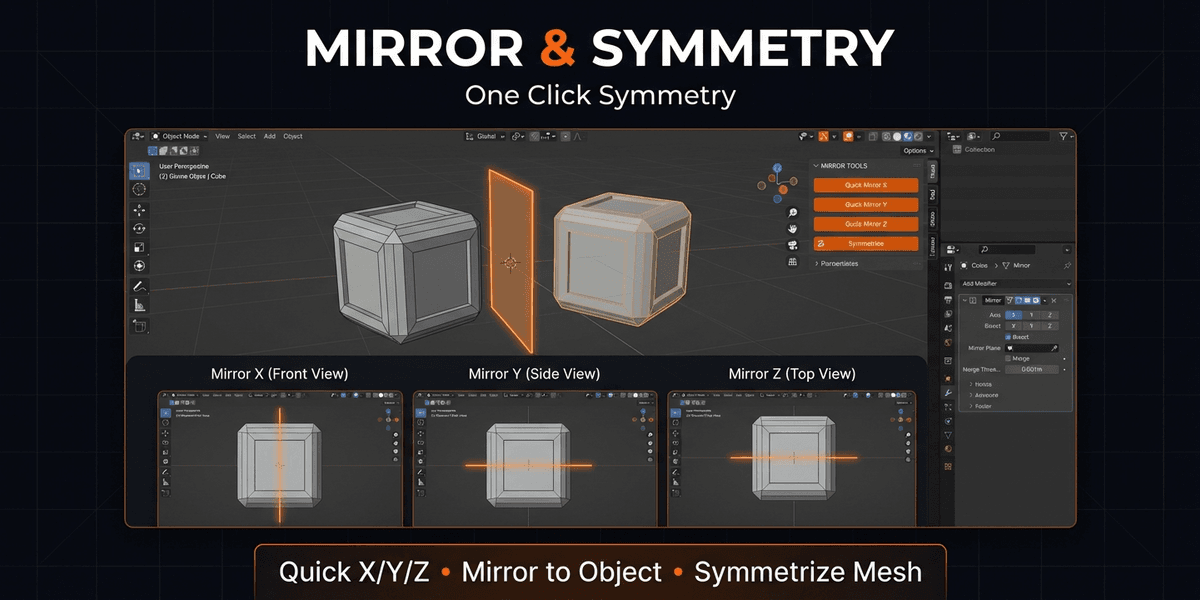
One-click mirroring on any axis. Quick Mirror X, Y, or Z with a single
button. Add Mirror modifier with full settings — bisect, flip, merge,
and configurable merge threshold. Mirror to Object uses any mesh as a
custom mirror plane. Symmetrize makes geometry perfectly symmetrical
by replacing one side with the other.
Normals & Shading
Complete shading control for clean renders. Switch between Smooth and
Flat shading instantly. Recalculate Normals fixes inverted or
inconsistent faces. Flip Normals reverses direction. Mark Sharp and
Clear Sharp define hard edges in edit mode. Sharp from Angle
auto-marks edges based on configurable angle threshold. Weighted
Normal modifier improves shading on complex geometry without manual
work.
Utility Tools
Cleanup Mesh removes doubles, dissolves degenerate geometry, and fixes
normals in one operation. Apply All Modifiers finalizes the entire
modifier stack. Reset Origin centers the origin point on geometry.
Triangulate adds a triangulate modifier for game engine export.
Requirements
- Blender 4.0 or newer
- No external dependencies
- Works on Windows, macOS, and Linux
Blender Add-ons
Hard Surface Toolkit Ultra
Professional hard surface modeling toolkit for Blender. 30+ tools for boolean operations, bevels, cutters, arrays, mirroring, and normals — all in one non-destructive workflow panel.
Tags
Frequently asked questions
Do I get access instantly?
Yes. This is a digital product — you can download it right after checkout, straight from your library.
Can I use it for commercial projects?
Your purchase includes a standard license for personal and commercial use. See the product description for any usage limits set by the seller.
What's your refund policy?
You're covered by a 30-day money-back guarantee. If something isn't right, request a refund from your order and the seller will review it.
What file formats and sizes will I get?
You'll download the files exactly as the seller packaged them (about 17.2 KB). See the product details and description for the included formats.
Do I get free updates?
Yes — when the seller ships a new version, you can re-download the latest files from your library at no extra cost. Check the changelog for recent updates.
Price
$9.99