Getly
Getly
You can sell ebooks online and ship a digital planner template in minutes, but the real win in 2026 comes from packaging. Buyers do not want “one file.” They want a workflow: prompts, layouts, and templates that make writing feel organized from day one.
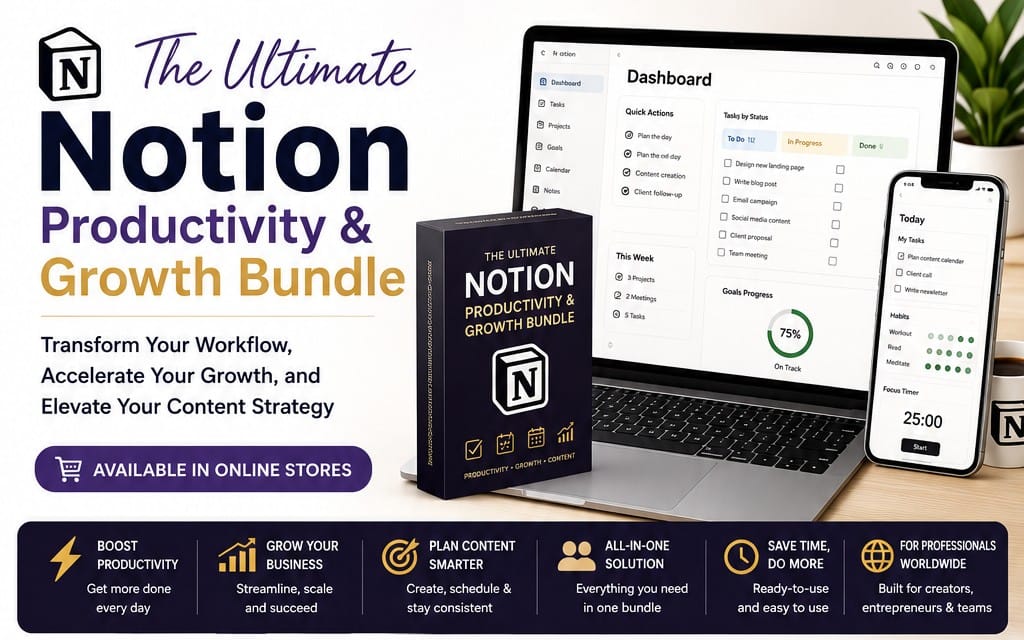
This article gives you 10 bundle ideas you can build around Notion templates, writing ecosystems, and ebook cover template styles. Each idea includes what to create, how to structure a bundle, and how to price it as a ready-to-use system.
- Bundle Notion templates + writing prompts + a small ebook cover template guide to raise perceived value.
- Sell ebooks online faster when your offer includes an outcome checklist and “how to use” pages.
- Use writing-specific categories: daily planning, content calendars, editing workflows, and habit tracking.
- Create “starter packs” plus “power-user” versions through multi-license tiers.
What is a writing bundle and why it sells in 2026?
A writing bundle combines multiple digital assets that work together: a Notion workspace, reusable templates, and a companion mini-guide or worksheet. In 2026, buyers shop by outcomes, so bundling lets you promise a complete writing workflow instead of a single download.
When you sell Notion templates as a system, your buyer’s first session feels successful. They open your space, follow a setup checklist, and start writing immediately. That reduces refunds because the product already “clicks” for their use case.
Bundle beats single files because workflows reduce decision fatigue
Most writers try a template and then abandon it because they still need structure: what to fill first, how to plan sessions, and how to track progress. A bundle can cover those missing steps with a guided onboarding page and repeatable templates.
You can also add a small “writing loop” kit: prompts, a revision checklist, and a content calendar view. The buyer experiences momentum, not blank pages.
Use outcomes, not features, in your offer title
Instead of listing “Notion pages,” title your bundle around results. Examples: “Publish-ready weekly writing system” or “Novel planning workspace with revision checklist.” Those phrases align with how buyers search.
Then mirror the outcome in the description: what they plan, how they draft, how they revise, and what they ship at the end.
Pro tip: Add a 1-page “Start here” guide with exact steps for the first hour. Buyers love templates they can activate immediately, especially when they buy on mobile.
How to sell Notion templates that match buyer intent?
To sell Notion templates, you must match the buyer’s intent: planning, drafting, editing, publishing, or habit building. In 2026, the strongest templates feel like a workspace, not a scrapbook.
Your job is to identify the specific writing moment a buyer needs help with, then design a template bundle around that moment.
Target search phrases with template naming
If you want to sell ebooks online and writing systems, write your page and section titles in the same wording buyers use. For example: “Daily Writing Plan,” “Weekly Content Calendar,” “Revision Checklist,” and “Project Dashboard.”
These titles become anchors for your customers and improve clarity. Even if a buyer never reads every description paragraph, they scan your workspace labels and understand the value quickly.
Design pages as modular blocks
Build your Notion templates in blocks that customers can reuse across projects. A clean module structure also helps you create multi-license variants later, because you can expand the “modules included” without rebuilding everything.
Common blocks that convert in writing bundles include dashboards, prompt libraries, session trackers, page templates for chapters or posts, and a revision rubric.
| Buyer need | Notion template module | Bundle add-on |
|---|---|---|
| Plan daily sessions | Daily Writing Planner | Prompt cards + page timer checklist |
| Write consistently | Habit and streak tracker | Monthly review worksheet |
| Draft structure | Outline workspace | Chapter or post scaffold sheet |
| Improve quality | Editing workflow view | Revision rubric + acceptance checklist |
Success pattern: bundles that include a “next action” checklist outperform bundles that only include layout files, because the buyer always knows what to do after the download.
10 writing bundle ideas you can build around Notion templates
Here are 10 ideas you can turn into selling-ready products in 2026. Each one pairs a Notion workspace concept with a bundle companion that supports writing from planning through publishing.
Use these as a menu. You can build one bundle first, validate it with your audience, then expand into a suite of related templates and ebook companions.
1) Digital planner template for writers
Create a digital planner template designed for writing sessions, not generic scheduling. Include a weekly layout that tracks word counts, session goals, and “next draft task.”
Bundle it with a simple worksheet: “Weekly Review and Next Week Plan.” This gives buyers a consistent loop and makes your planner feel complete.
2) Novel planning system (outline + revision loop)
Build a novel planning workspace with scenes or chapters, story beats, and a revision workflow. Add a “Revision Passes” board that tracks what changed in each pass.
Bundle a mini ebook cover template concept page: show how to align cover theme keywords with your story genre and tone. You do not need full design files. A guided worksheet works.
3) Content calendar for newsletter and blog publishing
Create a content calendar view with idea capture, draft status, editing stage, and publish schedule. Writers want to see progress at a glance.
Bundle a “topic to outline” worksheet: turn a single idea into headings and bullet points. This reduces the blank page problem.
4) Editing workflow template for first drafts to clean drafts
Design an editing system with step-by-step checklists. Include pass categories like structure, clarity, style, and consistency.
Bundle with a “quality rubric” page. Buyers love rubrics because they can self-check before submission.
5) Free printable templates upgrade pack (print-friendly companion)
Even if your main product is digital, some buyers want free printable templates for offline planning. Include printable pages as a bundle add-on.
Create a few high-value printables: a weekly writing sprint sheet and a revision checklist. Offer them as “print and mark up,” but still ship them as digital downloads.
Common mistake: selling “free printable templates” without matching the template to a real workflow. Buyers print once, then abandon. Tie your printables to a specific step in your Notion dashboard.
6) Daily journal template for writers with prompt library
Build a journal workspace with daily prompts, reflection tags, and a library of prompt categories. Keep it fast to use during writing sessions.
Bundle a “theme extraction” worksheet. It helps buyers turn journal entries into story ideas, essays, or posts.
7) Writing habit tracker with accountability goals
Create a habit dashboard focused on writing outcomes: sessions completed, pages drafted, and “minimum viable writing day” rules.
Bundle a monthly “behavior analysis” page: what worked, what blocked you, and what you change next month.
8) Ebook project manager (draft, format, publish plan)
Build an ebook project workspace that tracks drafting, chapter status, formatting tasks, and launch readiness. Make the dashboard “publish-oriented,” not “note-oriented.”
Bundle it with an ebook cover template checklist: fonts and layout decisions to consider before you finalize your cover design.
9) SEO blog writing template with outline-to-publish workflow
Create an SEO-first writing workspace with keyword field, outline view, internal link notes, and a publishing checklist. This helps content writers reduce rework.
Bundle with a “content brief generator” worksheet so buyers can standardize their process per article.
10) Writing bundle for course creators and educators
Design a workspace that supports course writing: lesson drafts, assignments, and a grading rubric tracker. Educators need structure and repeatability.
Bundle a “lesson writing sprint” planner plus a feedback summary template for iterations.
- Start with one writing workflow and build companion templates that plug into the same loop.
- Offer at least one worksheet that turns ideas into draft structure.
- Include a revision checklist to reduce buyer uncertainty.
How to structure ebook cover template assets for bundles?
Ebook cover template assets help you sell ebooks online because covers sit at the intersection of “creative work” and “publishing logistics.” Even if you do not produce the final artwork, you can sell guided templates and checklists that reduce cover confusion.
In 2026, buyers expect templates that support decisions: what to place, how to size text, and how to match cover style to genre expectations.
Offer cover guidance as a checklist or spec sheet
Create an ebook cover template as a spec sheet: layout blocks, typographic rules, and genre keyword mapping. You can also include a “cover testing” worksheet to help writers pick between two directions.
This approach keeps your product usable for different design tools. Buyers import the guidance into their own workflow.
Bundle the cover with your writing system
Pair cover assets with your book planning workspace. For example, your novel planning system can export “tone keywords” that the cover worksheet uses.
That tight connection makes your bundle feel like one product, not a pile of unrelated files.
Pro tip: Put your cover checklist inside the Notion workspace. Buyers trust templates more when they live next to the writing plan and revision tasks.
How to price and license writing bundles without scaring buyers?
Pricing works best when you align tiers with usage rights. For writing bundles, multi-license tiers let you support personal use and light commercial use while keeping your deliverables consistent.
Even if you do not adjust every component, you can license the template differently. Buyers pay for certainty and rights clarity.
Use tiering for personal vs. commercial creators
Create a personal tier for individual writers and a commercial tier for creators using templates for client work. Keep the actual template contents the same if you want to reduce support load.
Then document “what changes” per tier in plain language inside your product page and within the Notion workspace instructions.
Offer bundles and add-ons as separate line items
Bundle your flagship Notion templates with one companion worksheet. Then sell add-on packs for different writing stages, like “Revision Passes” or “Ebook Launch Checklist.”
This structure helps buyers self-select and reduces friction. It also improves your conversion rate when someone only needs one phase.
| Tier | Best for | What you include |
|---|---|---|
| Personal | Solo writers and students | Core Notion workspace + starter worksheets |
| Commercial | Creators selling their output | Full templates + expanded checklists |
| Extended | Coaches and teams | All modules + extra onboarding pages |
Common mistake: raising price without adding workflow depth. Buyers pay more for clarity, checklists, and repeatable steps, not for more folders.
How to validate bundle demand before you build everything?
Stop guessing which writing templates sell ebooks online. Validate demand with fast tests that do not require a full product rewrite.
You can validate by collecting requests, checking what people save, and shipping a small bundle first so you learn how buyers actually use it.
Run a “bundle sketch” test with 2 versions
Create two Notion templates with different primary outcomes. Example A: daily planner template for writers. Example B: editing workflow template for first drafts.
Publish both as early offers. Compare which one gets more traction and which requests you receive in messages or reviews.
Measure clarity with onboarding drop-offs
Your best signal is whether buyers reach “first success” quickly. Add an onboarding checklist inside the template and watch which step people struggle with based on feedback.
Then adjust your “Start here” guide. The smallest edits often improve conversion more than new page additions.
Success pattern: sellers who refine onboarding checklists after first feedback often reduce support questions and improve reviews within weeks.
Optional add-ons that boost your writing bundles
Add-ons help you sell bundles by supporting the skills around writing: content repurposing, product descriptions, and publishing-ready media. You can keep the writing system as the core and add focused extras.
When you add assets, connect them to a writing step. Buyers accept “adjacent value” when it reduces time during drafting, publishing, or marketing.
AI text and publication workflows
AI helps creators move faster, but it needs structure. A bundle can include an AI workflow note: how to generate outlines, vary examples, and create consistent tone across drafts.
If you sell ebooks online, you can also bundle an “AI-assisted draft” worksheet that turns prompts into sections your Notion database already tracks.
Design-adjacent templates for covers and promotion
Cover and promo design matter to writing bundles. Offer an ebook cover template checklist and optionally a text animation style for social previews.
That keeps your offer aligned with publishing. It also differentiates your bundle from writing templates that stop at planning.
If you want examples of how creators package adjacent digital skills, you can browse specific assets like “AI Product Description Generator - Bulk GPT Tool” and “Product Title AI Text Animation Mastery: Create Viral Videos Without Showing Your Face” (use them as inspiration for how to structure add-ons, not as writing replacements). For Notion template-style bundles, you can also look at writing and learning assets such as AI Product Description Generator - Bulk GPT Tool.
To keep your brand coherent, align add-ons to the buyer journey. A writing planner plus a cover checklist feels natural. A random video pack feels unrelated.
Keep boundaries clear for complex media items
If you include anything that touches NSFW topics or adult material, clearly label the product and limit it to the expected use case. Buyers should not discover content mismatch after purchase.
For example, if you ever bundle “NSFW video” alongside writing assets, you must ensure the writing system does not imply family-friendly content. Clarity protects your reputation.
FAQ: Sell ebooks online with Notion templates
How do I sell Notion templates without confusing buyers?
Use a single outcome-focused title and include a “Start here” onboarding page inside the template. Then list exactly what the buyer gets: the workspace, the companion worksheets, and how to use them in the first writing session.
What should I include in a digital planner template?
Include at least a weekly planning view and a daily writing session plan. Add a revision or review step so the planner supports iteration, not only scheduling. A one-page monthly review worksheet also boosts retention.
What does an ebook cover template guide do better than a full design file?
A guide helps buyers make decisions consistently. It maps genre keywords to cover layout ideas, suggests typography rules, and provides a pre-launch checklist. That guidance stays useful even if buyers use different design tools.
Are free printable templates worth bundling with Notion?
Yes if you connect them to a specific step in your Notion workflow. Printables work best as an offline companion to your weekly planning or revision checklist, not as standalone downloads.
How should I license writing bundles in 2026?
Use multi-license tiers to separate personal use and light commercial use. Keep your deliverables consistent if you want to reduce support complexity, and document what each tier allows in plain language.
- Sell ebooks online by bundling Notion templates with the writing loop: plan, draft, revise, and review.
- Make an ebook cover template checklist part of the workflow so buyers feel publishing-ready.
- Validate demand with two bundle versions focused on different writing outcomes.
Want a single next step? Build one bundle using idea #1 or #8, ship the onboarding checklist inside the Notion workspace, and iterate based on what buyers do in their first week of writing.