Project Management Templates
Ultimate Project Management OS™ — Excel Template
Ultimate Project Management OS™ is a premium, macro-free Excel template designed to help Project Managers, Agency Owners, Consultants, and Freelancers manage execution with the rigor of an operations control room. Built with the mindset of operational excellence and industrial discipline, this workbook centralizes your tasks, budget, milestones, workload, and risk management into one structured command center.
Product Description
Ultimate Project Management OS™ — Excel Template
A professional, software-like project control system built for disciplined execution.
Why pay for expensive PM software when a well-engineered Excel system can deliver the structure, visibility, and control you actually need?
Ultimate Project Management OS™ is a premium, macro-free Excel template designed to help Project Managers, Agency Owners, Consultants, and Freelancers manage execution with the rigor of an operations control room. Built with the mindset of operational excellence and industrial discipline, this workbook centralizes your tasks, budget, milestones, workload, and risk management into one structured command center.
It is not just a spreadsheet.
It is a practical operating system for project execution.
Turn Project Chaos into Controlled Execution
Most project failures do not happen because teams lack effort. They happen because visibility is fragmented, risks are logged too late, budgets are reviewed too infrequently, and overdue actions are not escalated early enough.
Ultimate Project Management OS™ solves that problem by giving you a single source of truth for project performance. It translates day-to-day activity into executive-level visibility, enabling faster decisions, tighter follow-up, and better delivery outcomes.
Whether you are leading client projects, internal initiatives, digital delivery, engineering workstreams, or agency operations, this template gives you a professional system to monitor what matters:
What is on track
What is slipping
What is over budget
What is at risk
Who owns the next action
What’s Inside
📊 Command Center Dashboard
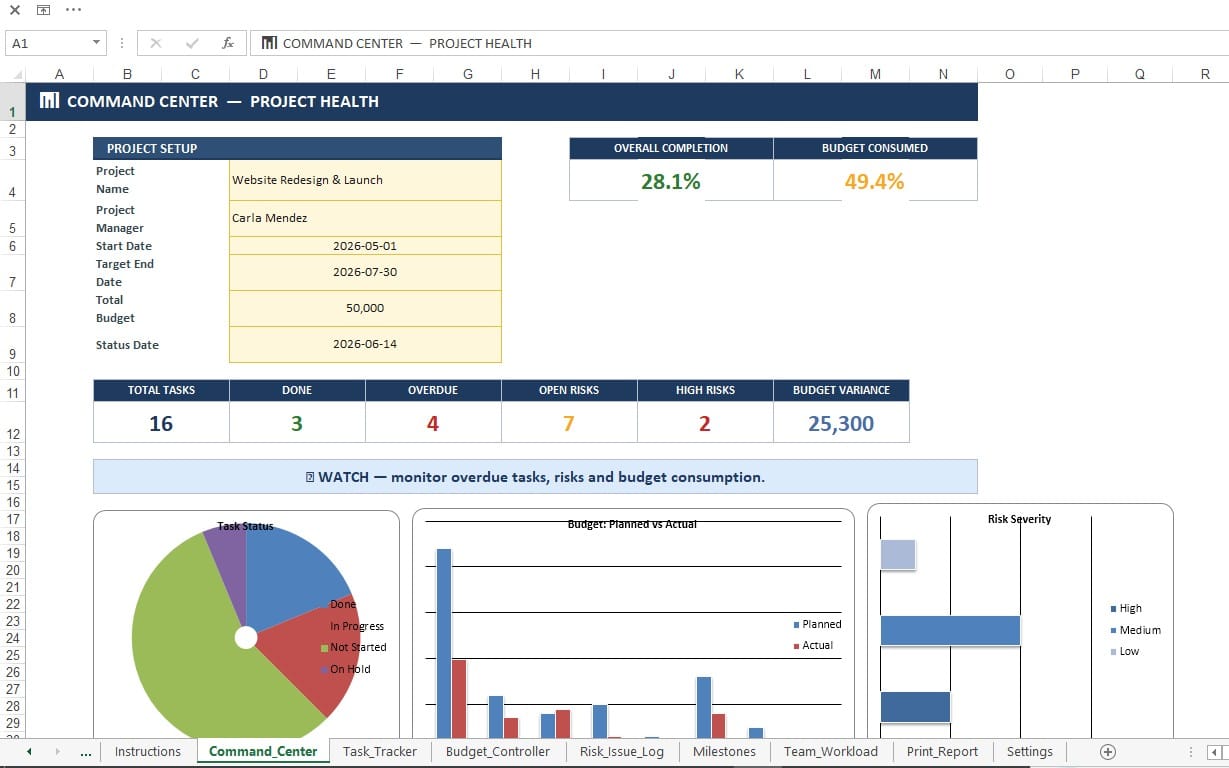
The heart of the workbook is the Command Center, a real-time executive dashboard that provides an immediate view of project health.
Monitor key performance indicators such as:
Overall project completion %
Budget consumption %
Total tasks, completed tasks, and overdue tasks
Open risks and high-severity risks
Budget variance
Delivery status banner: ON TRACK / WATCH / AT RISK
The dashboard also includes live charts for:
Task status distribution
Planned vs. actual budget
Risk severity breakdown
Tasks by project phase
This allows project leaders to move from raw data to decision-ready insight in seconds.
✅ Automated Task Tracker
The Task Tracker is designed for clean execution management. Enter your task information once, and the workbook handles the rest.
It automatically:
Calculates task duration from start and due dates
Derives completion percentage from task status
Displays visual progress bars for quick scanning
Flags overdue tasks in red when deadlines are missed
This structure improves schedule discipline and makes late work immediately visible before it impacts the entire project timeline.
💰 Budget Controller
Strong project execution requires financial discipline. The Budget Controller gives you a clear planned-versus-actual view by category, allowing you to monitor spending with precision.
Track:
Planned cost
Actual cost
Variance
% used
Budget status: On Budget / Watch / Over Budget
Automatic roll-ups provide total budget visibility, while conditional formatting highlights cost overruns before they become serious financial issues.
⚠️ Risk & Issue Log
Projects do not fail only because of late tasks. They fail because unmanaged risks quietly mature into operational problems.
The Risk & Issue Log gives you a structured method to identify, assess, and control uncertainty using a simple but effective scoring model:
Risk Score = Probability × Impact
The workbook automatically classifies severity levels:
Low: 1–6
Medium: 8–12
High: 15–25
Each risk can be assigned an owner, due date, mitigation plan, and status—creating the accountability needed for effective follow-through.
📍 Milestones and Team Workload
In addition to core project controls, the template includes dedicated sections for:
Milestones to monitor major delivery gates
Team Workload to balance assignments across resources and identify overloads early
This helps ensure that the project is not only progressing on paper, but also realistically executable from a resource and timing perspective.
🖨️ Print-Ready Reporting
For status meetings, client updates, and internal reviews, the workbook includes a Print Report sheet designed for fast, clean presentation.
Instead of manually compiling updates from multiple tabs, you can generate a professional summary directly from the system.
Why This Template Is Different
Many Excel templates are simply decorated tables.
This one is engineered like an operations system.
Ultimate Project Management OS™ was designed with principles taken from project governance, industrial engineering, and performance management:
Centralized control
Visual management
Exception-based monitoring
Accountability by ownership
Early warning through conditional logic
Structured execution review
In short, it helps you manage projects the same way high-performing operations manage production: with clarity, cadence, and control.
Key Benefits
1. One Centralized Source of Truth
No more scattered trackers, inconsistent updates, or disconnected files. Tasks, risks, and budgets are all managed in one integrated workbook.
2. Real-Time Project Visibility
The dashboard updates automatically as your data changes, giving you live insight into progress, cost, and risk exposure.
3. Faster Decision-Making
Instead of searching through rows of data, you see what needs attention immediately—overdue tasks, budget overruns, and high-risk items.
4. Better Accountability
Every critical issue can be linked to an owner, status, and due date, helping teams move from reporting problems to resolving them.
5. Professional Presentation
Use the workbook as a client-facing or executive-ready reporting tool without needing external software.
6. No Subscription, No Macro Risk
Built in .xlsx format, fully macro-free, and compatible with Excel 365 / 2021, with support for older versions and LibreOffice Calc.
Ideal For
This template is especially valuable for:
Project Managers managing execution across multiple workstreams
Agency Owners tracking delivery, deadlines, and client budgets
Freelancers and Consultants needing a premium system to manage projects professionally
Operations Leaders who prefer disciplined control over informal tracking
Small teams and growing businesses that need structure without paying for enterprise PM software
File Structure
This package includes:
A sample-data version that works immediately on open
A blank version for clean implementation
A complete workbook organized into the following sheets:
Cover
Instructions
Command_Center
Task_Tracker
Budget_Controller
Risk_Issue_Log
Milestones
Team_Workload
Print_Report
Settings
Built for Practical Use
This workbook was designed to be used immediately, not “configured for weeks.”
Editable fields are clearly highlighted
Formulas are protected to preserve structure
Layout is intuitive and presentation-ready
One currency per file for consistency
Real date-based scheduling for accurate tracking
Sheet protection is included to guard formulas and maintain data integrity, while still allowing users to update all intended input fields easily.
If You Manage Projects Like a Business, This Is for You
Project management is not only about tracking tasks.
It is about controlling execution.
Ultimate Project Management OS™ gives you the structure of a professional PM system with the simplicity and flexibility of Excel. It helps you standardize reporting, improve follow-up, manage risk proactively, and maintain a clear picture of delivery performance at all times.
If you are serious about running projects with discipline, visibility, and accountability—without paying for complex software—this template was built for you.
Take control of your projects with a system designed for execution.
Get the Ultimate Project Management OS™ today.
Project Management Templates
Ultimate Project Management OS™ — Excel Template
Ultimate Project Management OS™ is a premium, macro-free Excel template designed to help Project Managers, Agency Owners, Consultants, and Freelancers manage execution with the rigor of an operations control room. Built with the mindset of operational excellence and industrial discipline, this workbook centralizes your tasks, budget, milestones, workload, and risk management into one structured command center.
Tags
Frequently asked questions
Do I get access instantly?
Yes. This is a digital product — you can download it right after checkout, straight from your library.
Can I use it for commercial projects?
Your purchase includes a standard license for personal and commercial use. See the product description for any usage limits set by the seller.
What's your refund policy?
You're covered by a 30-day money-back guarantee. If something isn't right, request a refund from your order and the seller will review it.
What file formats and sizes will I get?
You'll download the files exactly as the seller packaged them (about 37.44 KB). See the product details and description for the included formats.
Do I get free updates?
Yes — when the seller ships a new version, you can re-download the latest files from your library at no extra cost. Check the changelog for recent updates.
Price
$9.00