Getly
Getly
By the end of this guide, you can build prompts that give an AI tool a clear job, useful background, firm boundaries, and a repeatable output format. You will also know how to test a prompt, diagnose inconsistent answers, and improve one variable at a time.
TL;DR: Build prompts in four layers
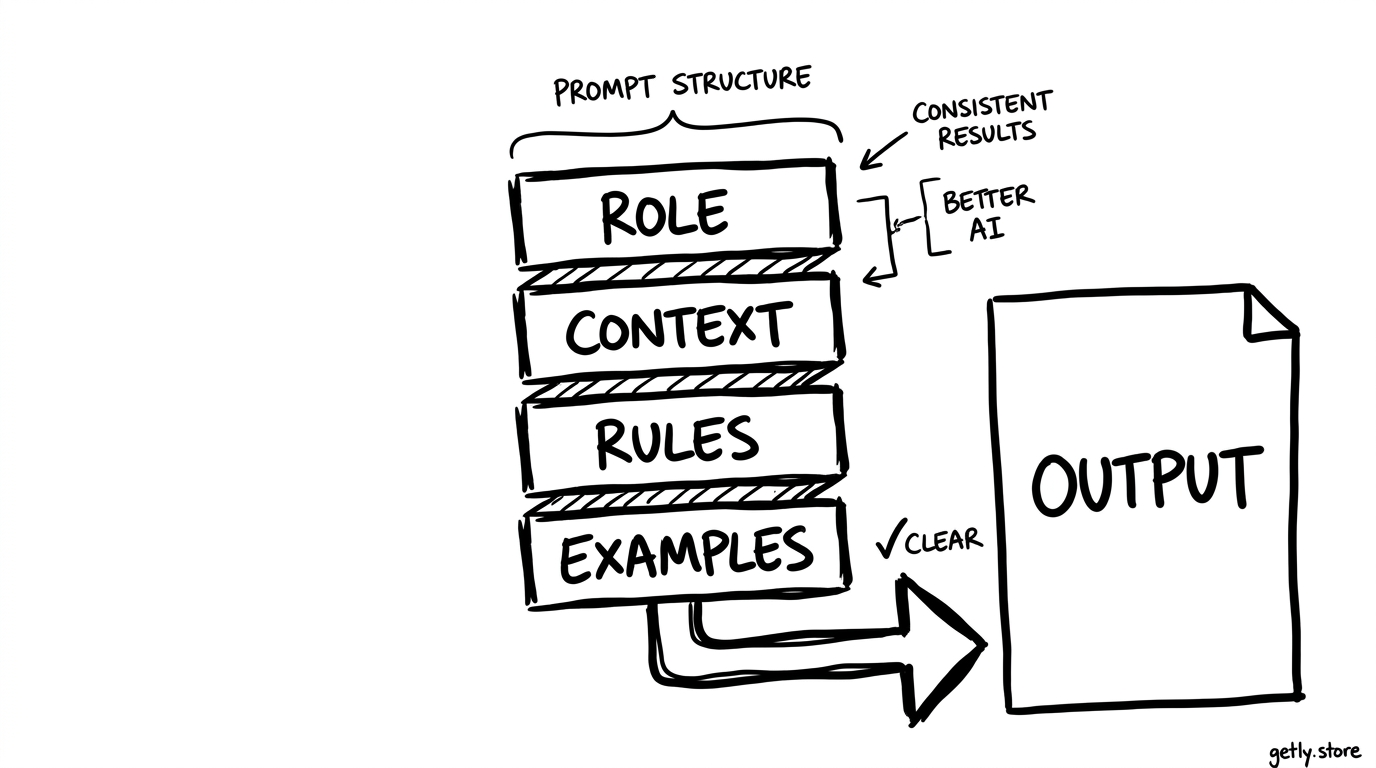
A dependable prompt usually contains four parts:
- Role: define the expertise and point of view the tool should use.
- Context: supply the facts, audience, purpose, and source material needed for the task.
- Constraints: set limits for length, tone, structure, exclusions, and quality checks.
- Examples: show the shape and level of quality you expect.
Put the task near the start, then add these four layers in a logical order. Finish with the exact output format. This structure reduces guesswork because the tool can separate the job from the conditions around it.
1. Start with a precise task and role
Write the task before you add detail. A vague request such as “help with my product page” gives the tool too many possible jobs. A precise request gives it one action and one outcome:
Weak: “Write something for my digital planner.”
Stronger: “Write five product-description options for a digital weekly planner aimed at freelance designers. Highlight the editable schedule, project tracker, and printable PDF pages.”
The second version names the deliverable, quantity, audience, product, and selling points. Those details give you a stable basis for comparing future outputs.
Add a role when expertise or perspective affects the result. Use a role that matches the work, such as “conversion copywriter for digital products,” “curriculum designer for adult beginners,” or “art director for editorial illustrations.” Avoid inflated roles such as “the world’s best expert.” Grand titles add tone, but they do not add useful instructions.
Define the role with two or three capabilities:
- “You write concise landing-page copy for buyers who compare several digital products.”
- “You edit for plain English, concrete benefits, and accurate claims.”
Give the tool a job, not a costume. A role should influence decisions about vocabulary, priorities, and evaluation.
2. Supply context the task cannot infer
Context answers the questions that sit behind the task: Who will read this? What should they do next? Which facts can the writer use? What must the writer avoid? Add only information that changes the result.
For a digital product, useful context might include:
- the product type and file format
- the buyer’s skill level and main problem
- the product’s confirmed features
- the channel, such as a product page, email, or social post
- the desired action, such as download, compare, or purchase
Separate facts from instructions. A short labeled block helps the tool keep both categories intact:
Product: a 12-page PDF workbook for planning a freelance project.
Audience: solo designers who lose track of deadlines.
Goal: explain the product and encourage a sample-page download.
Confirmed features: project brief, milestone tracker, revision log, and final checklist.
Specific context prevents invented details. If a product has no video lessons, do not leave the format open to interpretation. Write “Describe the product as a PDF workbook. Do not mention video lessons, coaching, or a mobile app.”
Keep context current within the working session. If you revise a product feature, replace the old detail instead of adding a correction several paragraphs later. Conflicting instructions make consistency harder to measure.
3. Turn preferences into measurable constraints
“Make it good” gives the tool no test. A constraint gives you something you can inspect. Set limits for length, structure, voice, audience, claims, and formatting.
Useful constraints look like these:
- Write 120 to 150 words.
- Use a friendly, practical tone for smart beginners.
- Open with the buyer’s problem, then explain three product features.
- Use one heading and a five-item bullet list.
- Use sentences under 20 words where possible.
- Make no claims about income, guaranteed results, or exclusive access.
Choose constraints that protect the outcome. A word count can control a product card, while a required section order can make a tutorial easier to scan. Too many cosmetic rules can crowd out the main task, so keep the list focused.
Specify the output format in a separate instruction. For example:
Return: one headline under 60 characters, one 40-word summary, and five bullets. Label each part. Do not add commentary before or after the requested content.
Tell the tool how to handle missing information. “Use only the confirmed features. If a detail is absent, omit it” works better than asking it to fill gaps with plausible guesses. This rule matters for product pages, course descriptions, financial copy, and any work that carries factual risk.
Do
- Set a word range and a clear structure.
- Name claims, topics, and terms to exclude.
Don't
- Stack unrelated style preferences into one sentence.
- Ask for accuracy without defining acceptable sources or facts.
4. Use examples to show the target
Examples teach patterns that adjectives cannot describe. A sample headline can show sentence length, specificity, rhythm, and benefit. A sample product description can show how much detail belongs in each paragraph.
Give two examples when the task has more than one important pattern. For a product page, one example can show the preferred structure and another can show an acceptable variation. Label them so the tool understands what each sample demonstrates.
Example 1, preferred structure: “Plan your next client project in one focused workbook. Map milestones, record revisions, and finish with a clear delivery checklist.”
Example 2, acceptable variation: “A printable project planner for designers who need one place for briefs, deadlines, revisions, and final handoff notes.”
Explain the lesson after the examples: “Use concrete product actions, mention the buyer’s problem, and avoid broad promises.” That sentence keeps the tool from copying surface details such as the exact number of clauses or the word “focused.”
Use negative examples with care. Show one weak line only when the error matters, then name the correction:
Avoid: “Transform your workflow forever.”
Reason: the claim is broad and unverifiable.
Prefer: “Track project milestones and revision notes in one printable workbook.”
For repeatable work, save a small example set with the prompt. A creator who publishes ten product descriptions can reuse the same two or three samples, then change the product context. A buyer who generates study notes can provide one sample with the preferred heading and summary format.
5. Assemble a reusable prompt template
Combine the layers into a template with labeled fields. Labels make revisions faster because you can change the audience without rewriting the constraints.
Role: You are a conversion copywriter for digital products. Write for readers who compare several options before buying.
Task: Write a product-page description for the product below.
Context: Product: [name and format]. Audience: [specific buyer]. Problem: [problem]. Confirmed features: [features]. Goal: [action].
Constraints: Use [tone]. Write [length]. Include [required points]. Avoid [banned claims or topics]. Use only the confirmed features.
Examples: Follow the structure and specificity shown in [sample 1] and [sample 2]. Do not copy their wording.
Output: Return [exact sections and order]. Do not add an introduction or closing note.
Test the template with different products while keeping the structure stable. This approach shows which changes come from the product and which changes come from the prompt. A prompt library can help you store proven templates for copywriting, research, design briefs, and customer education. For a broader starting collection, you can browse this AI prompts cheat sheet.
Define the job
Name one deliverable, audience, and purpose.
Add reliable context
List the facts and features the output may use.
Set boundaries
Specify length, tone, format, and exclusions.
Show examples
Demonstrate the structure and quality you want.
Test one change
Revise a single prompt variable before comparing results.
6. Test consistency and fix the right layer
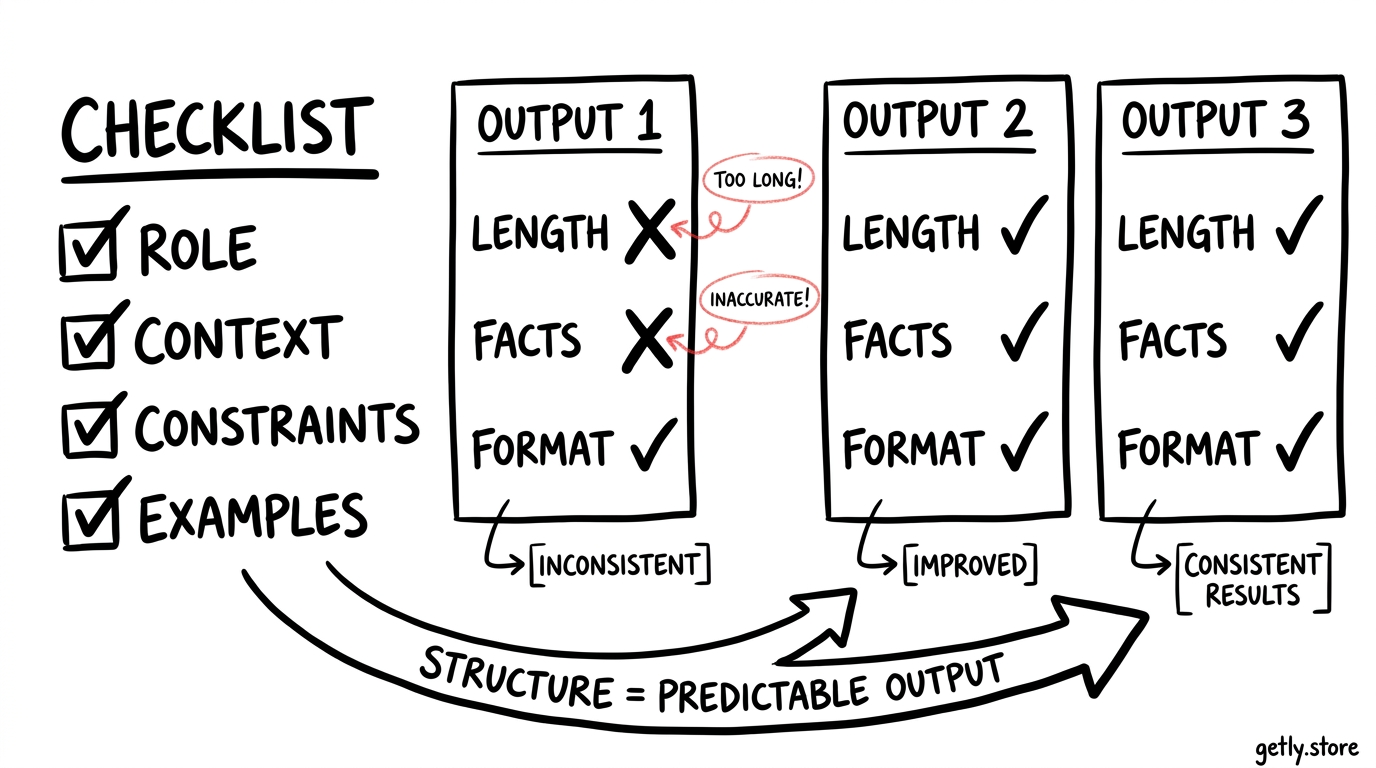
Run the same prompt several times and compare the parts that matter. Check factual coverage, length, structure, tone, and compliance with exclusions. A useful test set contains at least three different inputs, such as three products or three audience problems.
Use a simple scorecard:
- Task completion: Did the response produce the requested deliverable?
- Fact control: Did it use confirmed details without inventing features?
- Format: Did it follow the requested sections, count, and order?
- Audience fit: Does the vocabulary suit the intended buyer?
- Voice: Does the result match the examples?
Fix the layer that caused the problem. Add context when the tool invents a feature. Add a constraint when the length drifts. Add an example when the tone feels inconsistent. Clarify the task when the output solves the wrong problem.
Change one variable at a time. If you add a new role, rewrite the examples, and shorten the task in one edit, you will not know which change improved the result. Keep a dated copy of each tested prompt and record the failure you wanted to fix.
Common mistakes that weaken prompt results
Vague quality language
Words such as “professional,” “engaging,” and “creative” need a working definition. Replace them with observable choices, such as “use concrete verbs, one example, and no slogans.”
Too many jobs in one prompt
Ask for research, strategy, copy, and design in separate stages when each job needs a different standard. One prompt can create a draft, but separate review prompts make quality easier to check.
Conflicting instructions
“Keep it concise” and “explain every detail” pull in opposite directions. Choose a priority, then set a measurable limit such as 180 words with three required points.
Examples that do not match the request
A playful social caption will teach the wrong pattern if you ask for formal product documentation. Match examples to the audience, channel, and purpose.
Changing the prompt without tracking results
Save the prompt, input, output, and scorecard. This record turns random tweaking into a repeatable editing process.
FAQ
How long should an AI prompt be?
Make the prompt long enough to define the task, context, constraints, examples, and output format. A short product description may need 100 words of instruction, while a research workflow may need several labeled sections. Remove repeated guidance before removing useful context.
Do I need to include a role in every prompt?
No. Add a role when expertise, audience perspective, or editorial judgment affects the result. A simple conversion task may need only the task, facts, constraints, and output format.
How many examples should I provide?
Start with one strong example for a simple format and two examples when the task allows meaningful variation. Use examples that match the requested audience, channel, tone, and level of detail.
What should I do when results vary between runs?
Compare the outputs against a fixed scorecard. Tighten the task, add missing context, clarify constraints, or improve the examples based on the specific failure. Change one prompt element at a time so you can identify the cause.
Frequently asked questions
How long should an AI prompt be?
Make the prompt long enough to define the task, context, constraints, examples, and output format. Remove repetition, but keep details that affect the result.
Do I need to include a role in every prompt?
No. Add a role when expertise, audience perspective, or editorial judgment affects the task. Simple requests may work without one.
How many examples should I provide?
Start with one strong example for a simple format and two examples when the task allows meaningful variation. Match each example to the requested audience and channel.
What should I do when results vary between runs?
Compare each output against a fixed scorecard, then revise the layer linked to the failure. Change one prompt element at a time so you can identify the cause.