Getly
Getly
By the end of this guide, you will know how to inspect a purchased prompt pack, replace its variables, test each prompt, and connect several prompts into one repeatable workflow. You will also have a simple system for saving the prompts that suit your work and improving them after each project.
TL;DR: turn a prompt pack into a working system
Treat a prompt pack as a set of starting points, not a finished operating manual. First, identify each prompt's purpose and mark every variable. Next, run a small test with one realistic example. Then, connect prompts through shared outputs, such as a brief that feeds an outline or an outline that feeds a product description.
Save the useful version in a personal library with its purpose, variables, sample input, and last successful output. That record helps you reuse a prompt without guessing which edits made it work.
Inspect
Mark the prompt's role, variables, constraints, and expected output.
Adapt
Replace placeholders with specific details from your project.
Test
Run three controlled trials and change one factor at a time.
Chain
Pass a useful output into the next prompt's input.
Save
Record the working version, example, and revision notes.
1. Inspect the pack before you edit it
Start with the pack's table of contents or file names. Group prompts by job: research, planning, writing, editing, analysis, customer support, or image direction. A prompt's job determines the information it needs. A product-description prompt needs product facts and audience details, while an editing prompt needs text plus a clear definition of acceptable changes.
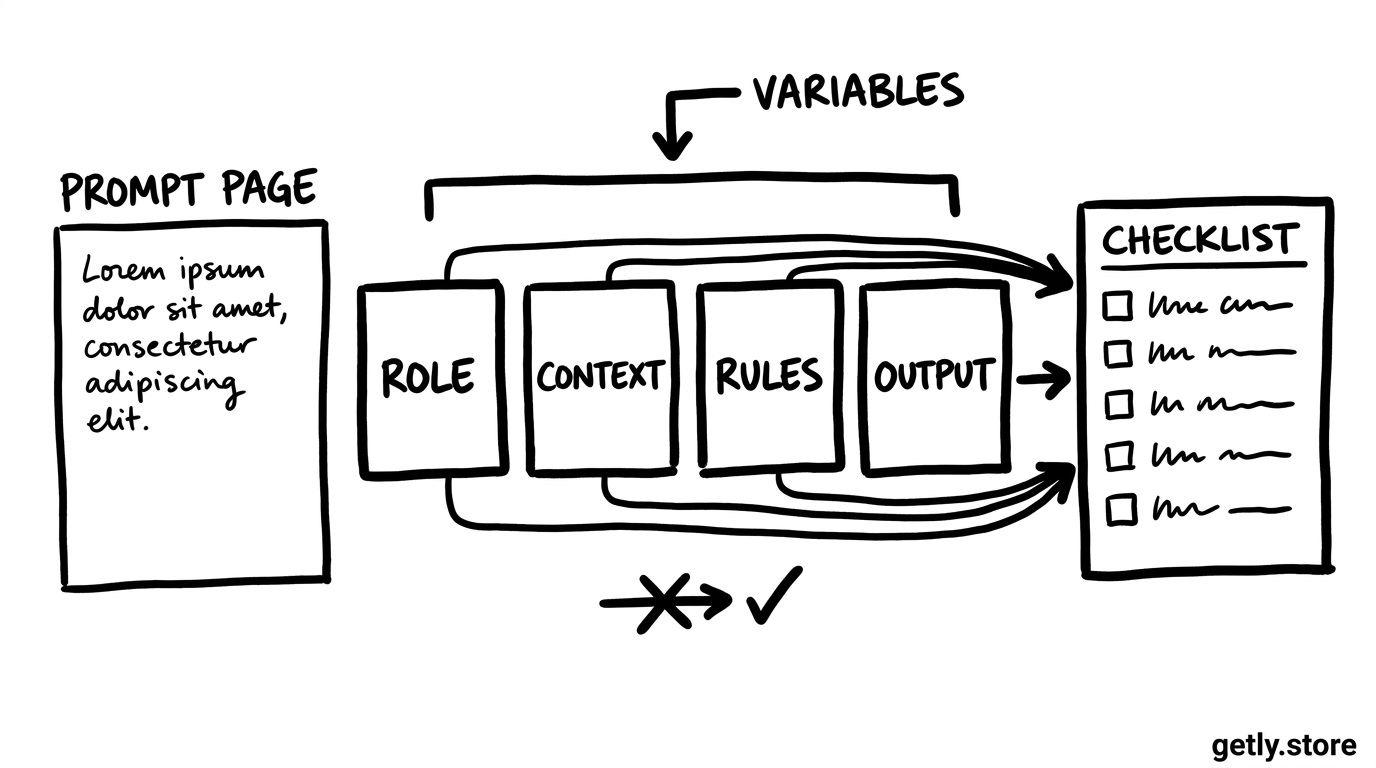
Open one prompt and mark four parts:
- Role: the perspective or expertise you want the tool to use.
- Context: facts, source material, audience information, and project background.
- Instructions: the actions the tool should take and the order it should follow.
- Output rules: format, length, tone, sections, exclusions, and examples.
Look for placeholders such as [PRODUCT], {AUDIENCE}, or phrases like “insert your topic.” Create a short variable list beside the prompt. Include the variable name, the value for your current project, and the reason that value matters.
A purchased guide such as Учебник промтов для Claude may use examples from a specific field. Keep the underlying structure when the example does not match your work. Replace the domain details, not the useful sequence of instructions.
2. Replace variables with useful project details
Variables give a prompt room to travel between projects. Weak variables contain broad labels such as “business” or “good tone.” Strong variables contain details that change the answer, such as “a $29 printable meal planner for first-time parents who need five-minute planning sessions.”
Use these five variable types when you adapt a prompt:
- Subject: the product, service, topic, or source material.
- Audience: the reader's role, skill level, need, and buying context.
- Goal: the action or decision the output should support.
- Boundaries: claims to avoid, source limits, word count, tone, and legal or brand rules.
- Format: headings, bullets, table fields, JSON keys, or another structure.
Write each value as if you were briefing a capable colleague. Instead of “make it friendly,” write “use plain language, short paragraphs, and a calm tone; avoid jokes and sales pressure.” Instead of “write for beginners,” write “assume the reader understands basic online shopping but has not used a prompt workflow.”
Keep instructions separate from variable values. Put your project details in a labeled block, then place the task below it. This separation makes later edits safer because you can change the product or audience without rewriting the whole prompt.
Do
- Give the audience a specific situation and level of knowledge.
- State the output format and length.
- Add one good example when style matters.
Don't
- Use “make it better” as the main instruction.
- Mix five unrelated tasks into one prompt.
- Hide important constraints inside a long paragraph.
3. Test one prompt before you build a chain
Run the adapted prompt with a real but manageable example. Choose a project that lets you judge the result quickly. A short product description works better for the first test than a complete launch campaign because you can spot missing facts and weak instructions within minutes.
Use three trials. Keep the prompt unchanged in the first trial and record the output. In the second trial, improve one variable, such as the audience description. In the third trial, improve one instruction or output rule. This method shows which change affected the result.
Judge the output against a short checklist:
- Did the result address the stated audience?
- Did it follow the requested format?
- Did it use the supplied facts without inventing details?
- Did it match the tone and level of detail you requested?
- Could you edit the result into a finished asset?
Fix the prompt when the same problem appears across trials. If the tool invents a feature, add a rule such as “use only the facts in the product brief and mark missing information for review.” If the output rambles, set a word range and name the sections you need.
These bars show a prompt audit for one example, not a quality score for every task. A prompt usually gives you more control when it names the audience, goal, boundaries, and output format together.
4. Chain prompts through clear handoffs
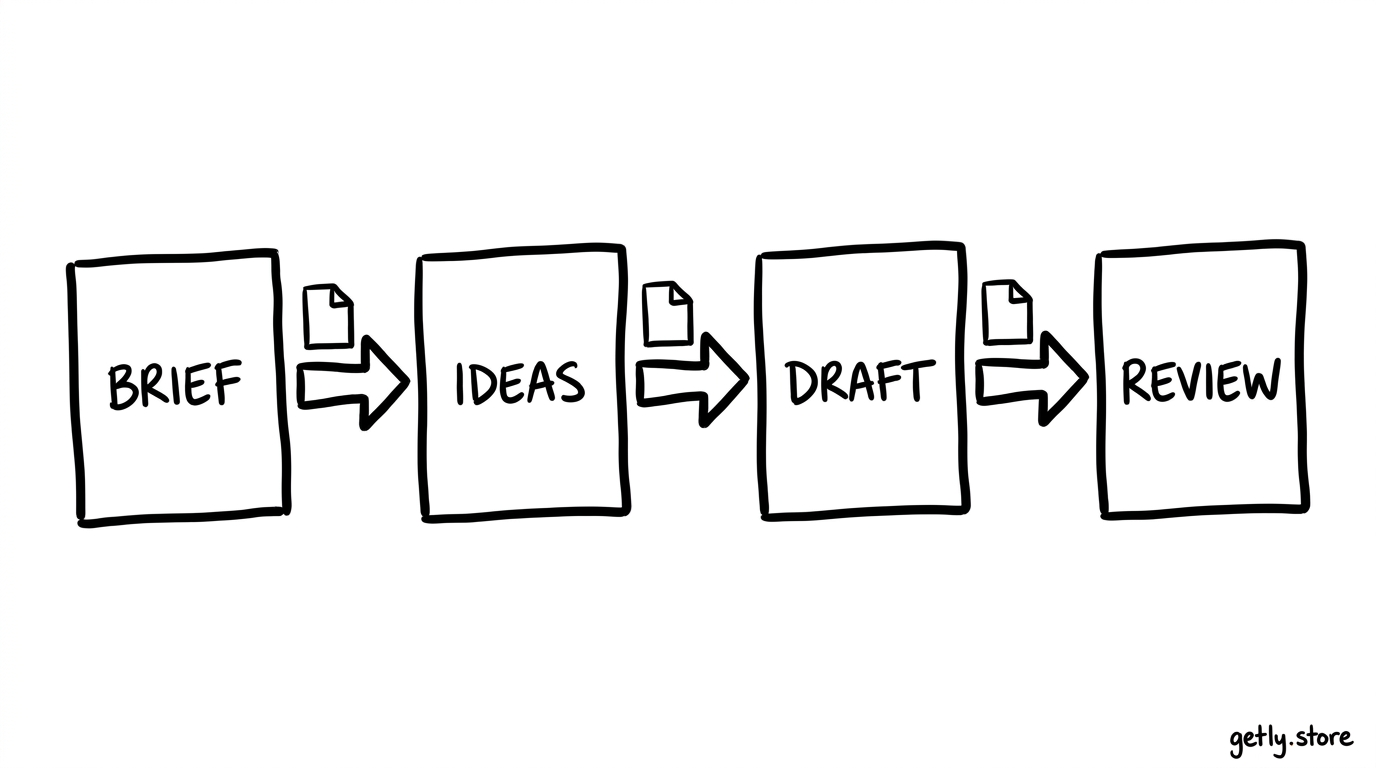
A chain divides a large job into smaller decisions. Each prompt handles one stage and produces an artifact for the next stage. A useful creator workflow might look like this:
- Brief prompt: turn raw product notes into a concise project brief.
- Idea prompt: create several angles from that brief and rank them against the audience's needs.
- Draft prompt: write one selected angle in the required format.
- Review prompt: check accuracy, clarity, tone, and missing information.
Give each stage a single job. A prompt that researches, writes, fact-checks, formats, and creates social posts in one pass makes errors hard to locate. Separate stages let you inspect the brief before it shapes the draft.
Build each handoff with a compact output contract. Tell the first prompt to return fields such as audience_problem, product_promise, proof_points, and open_questions. Tell the next prompt to use those fields as its input. Shared labels reduce confusion and make the chain easier to rebuild in another tool.
Pass only the information the next stage needs. A review prompt may need the draft, brand rules, and product facts, but it does not need every brainstorming note. Smaller handoffs reduce repetition and help you notice unsupported claims.
Keep a human checkpoint between stages that affect money, reputation, safety, or customer promises. Read the brief before drafting, and approve factual claims before publication. A chain should speed up decisions while you retain responsibility for the final result.
5. Build a personal prompt library
Save prompts by task rather than by the name of the pack. Categories such as “product launch,” “customer research,” and “course lesson” help you find a prompt when a project arrives. Add a second label for the output type, such as “outline,” “email,” or “review.”
Give every saved prompt a short record:
- Name: use a searchable task name, such as “Product brief from raw notes.”
- Purpose: describe the decision or asset the prompt supports.
- Inputs: list the variables and the format each variable needs.
- Prompt: keep the reusable version separate from one project's values.
- Example: save one input and a strong output.
- Notes: record failures, useful edits, and conditions that affect results.
Keep a version date in the record, but avoid scattering copies across folders. Update the main entry after a successful revision and keep a short change note. For example: “Added audience skill level and reduced the output to four sections.” That note explains why the new version performs better.
Review the library after several projects. Delete duplicates, combine prompts that solve the same task, and move unreliable prompts into a testing area. Your library should make the next project faster to start, not give you another archive to search.
6. Common mistakes when using purchased prompt packs
Copying every instruction unchanged. A pack author chose examples for a particular audience and workflow. Remove brand references, assumptions, and output rules that do not fit your project.
Changing too many parts at once. When you rewrite the role, context, task, and format in one edit, you lose the ability to identify the useful change. Test one variable or instruction at a time.
Using vague variables. “Target market” and “professional tone” leave too much room for interpretation. Add a specific buyer situation, desired action, vocabulary level, and tone description.
Chaining without checking outputs. A flawed brief can spread its assumptions through every later stage. Inspect each handoff and correct the source prompt before continuing.
Saving only the prompt. A prompt without its input format and successful example forces you to reconstruct the workflow later. Save the surrounding instructions that made the result useful.
Trusting fluent claims. Smooth writing does not verify product facts, prices, research, or customer promises. Compare important statements with your source material before you publish or sell.
Use the pack as a starting point
Choose one prompt from the pack and adapt it to one real task. Mark its variables, run three controlled trials, and save the strongest version with an example. After that prompt works on its own, connect it to the next stage through a small, labeled handoff.
That workflow turns a collection of prompts into a set of reusable tools. Your notes preserve the decisions that made each tool work, so the library improves with every project.
Frequently asked questions
Should I use a purchased prompt exactly as written?
Use the original prompt as a baseline, then replace its examples, audience, product details, tone, and output rules with details from your project. Keep the structure that supports the task and remove assumptions that do not fit.
How many variables should a prompt include?
Include the variables that change the answer, usually the subject, audience, goal, boundaries, and format. Add more only when the task needs them. Clear values matter more than a long variable list.
What makes a good prompt chain?
A good chain gives each prompt one job, defines the output from each stage, and passes only the information the next stage needs. Check important outputs before they influence later stages.
What should I save in a personal prompt library?
Save the task name, purpose, input variables, reusable prompt, one strong example, revision date, and notes about failures or successful edits. This record lets you reuse the prompt without reconstructing the workflow.