Excel Templates
FactoryOS — Advanced FMEA Pro Excel Template
FactoryOS Advanced FMEA Pro transforms your traditional spreadsheet into a dynamic, decision-driven FMEA Excel Template that not only calculates Risk Priority Numbers (RPN), but also validates whether your corrective actions genuinely reduce risk.
Product Description
FactoryOS — Advanced FMEA Pro
Smart RPN Analysis, Post-Action Risk Validation & Structured Action Tracking in Excel
A Living FMEA System That Proves Your Corrective Actions Actually Reduce Risk
Stop Treating FMEA as a Static Document
In many organizations, FMEA is created for audits — then forgotten.
FactoryOS Advanced FMEA Pro transforms your traditional spreadsheet into a dynamic, decision-driven FMEA Excel Template that not only calculates Risk Priority Numbers (RPN), but also validates whether your corrective actions genuinely reduce risk.
This is not just an RPN calculator.
It is a structured Risk Reduction and Action Management System built inside Excel.
What Makes This FMEA Tool Different?
Most FMEA sheets stop at calculating Severity × Occurrence × Detection.
Advanced FMEA Pro goes further by adding:
Smart risk visualization
Post-action RPN recalculation
Quantified risk reduction percentage
Weak-action detection logic
Structured action ownership and tracking
Executive-level risk dashboard
It ensures your FMEA becomes a living operational control tool — not an audit artifact.
Core Capabilities
🎨 Smart RPN Color Coding
The template automatically calculates the Risk Priority Number (RPN) using:
Severity × Occurrence × Detection
Each failure mode is visually categorized using intelligent color logic:
Green for controlled risk
Yellow for moderate concern
Red for critical priority
This immediate visual feedback helps teams focus on what truly matters during FMEA workshops and risk reviews.
🔁 Post-Action RPN Recalculation & Risk Reduction %
After defining corrective or preventive actions, you can enter updated Occurrence and Detection scores.
The system automatically calculates:
New RPN
Absolute RPN reduction
Percentage risk reduction
This allows you to prove — quantitatively — how much risk has been removed.
It turns your file into a practical Risk Priority Number calculator with before-and-after validation.
⚠️ Weak-Action Detection Logic
One of the most powerful features:
The template flags “weak actions” automatically.
If an action barely changes the RPN or reduces risk below a defined threshold, it is highlighted for review.
This prevents teams from closing actions that look good on paper but have negligible real-world impact.
Ideal for organizations focused on robust root cause correction and sustainable risk mitigation.
👤 Built-In Action Tracking System
Advanced FMEA Pro includes structured FMEA action tracking, with fields for:
Action owner
Due date
Completion status
Overdue alerts
No more separate action logs.
No more disconnected improvement lists.
Your FMEA becomes a centralized risk and accountability tool.
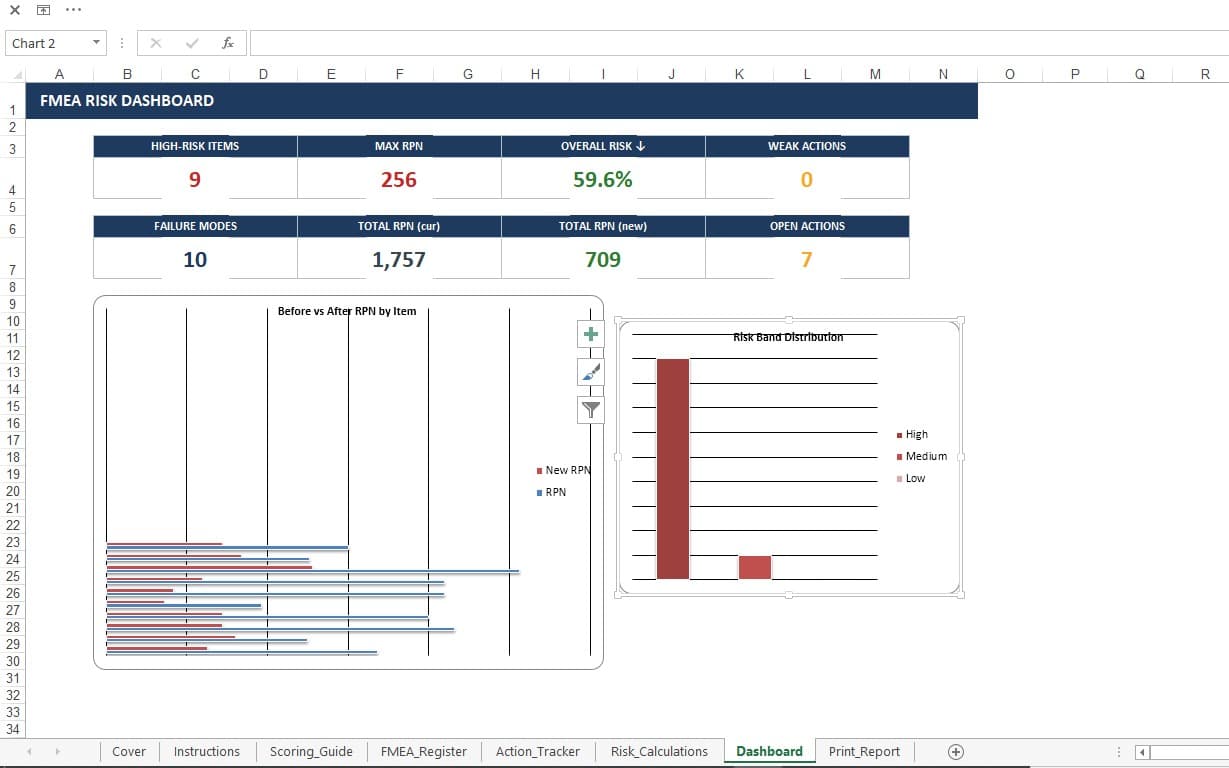
📊 Executive Risk Dashboard
The built-in dashboard provides management-level visibility, including:
Highest current RPN risks
Largest achieved risk reductions
Weak or ineffective actions
Open and overdue items
It enables plant managers, quality directors, and consultants to review risk posture at a glance.
Perfect for:
ISO 9001 audits
IATF 16949 reviews
Customer risk assessments
Internal improvement steering meetings
Built for Real-World FMEA Applications
This tool supports both:
Process FMEA (PFMEA)
Design FMEA (DFMEA)
It aligns with established risk management practices used in manufacturing, engineering, and regulated industries.
It also supports continuous improvement initiatives, Six Sigma projects, and structured problem-solving programs.
Business Impact
When used correctly, Advanced FMEA Pro helps organizations:
Prioritize high-impact risks objectively
Ensure corrective actions truly reduce exposure
Improve audit readiness
Strengthen customer confidence
Increase accountability in improvement programs
Avoid recurring failures caused by weak mitigation
It transforms FMEA from a compliance exercise into a strategic risk-management tool.
Designed for Professionals
Ideal for:
Quality Engineers
Reliability Engineers
Process Engineers
Continuous Improvement Leaders
Manufacturing Consultants
Audit and Compliance Managers
Especially in environments where risk documentation must be both technically sound and customer-ready.
Why Excel?
Because Excel provides:
Universal accessibility
Transparent and auditable calculations
Easy deployment across teams
Flexible customization for different industries
FactoryOS Advanced FMEA Pro contains no hidden code, no black-box macros, and no complex add-ins — only clear, structured logic.
From Static Form to Living Risk Engine
FactoryOS Advanced FMEA Pro delivers:
Intelligent RPN analysis
Quantified post-action validation
Weak-action detection
Structured action ownership
Executive-ready dashboard reporting
This is a professional-grade FMEA Excel solution that ensures your risk reduction efforts are measurable, visible, and defensible.
Excel Templates
FactoryOS — Advanced FMEA Pro Excel Template
FactoryOS Advanced FMEA Pro transforms your traditional spreadsheet into a dynamic, decision-driven FMEA Excel Template that not only calculates Risk Priority Numbers (RPN), but also validates whether your corrective actions genuinely reduce risk.
Tags
Price
$19.00