Getly
Modèles Notion
All-in-One Business OS – Ultimate Notion Business Management Template
Cette annonce est affichée dans sa langue d'origine (anglais).
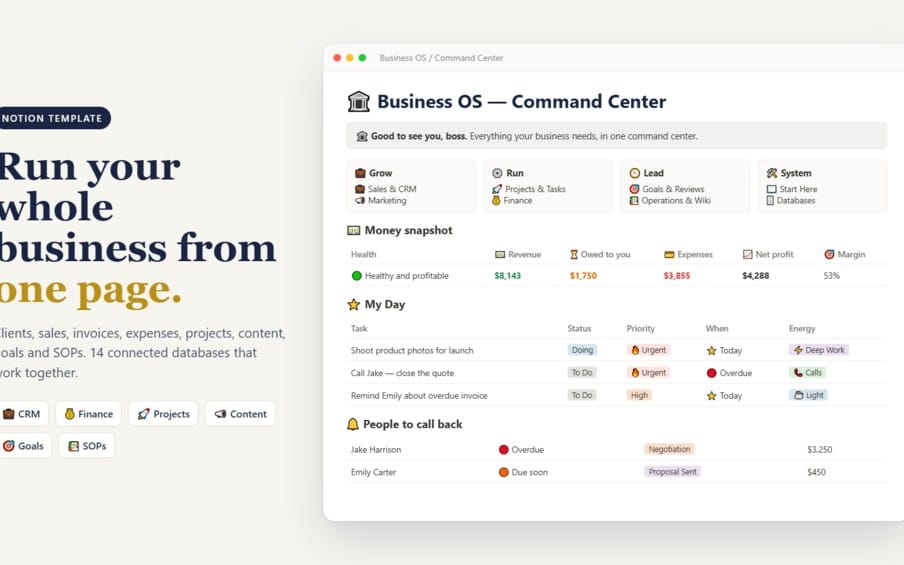
Organize your entire business in one place with this all-in-one Notion template. Manage tasks, projects, goals, workflows, and daily business activities with a structured workspace built for freelancers, entrepreneurs, small business owners, and content creators.
Ce que vous recevez : 1 fichier · 4.92 KB · PDF
Voir les options d'achatAperçu
Description du produit
All-in-One Business OS – Your Complete Notion Business Management System
Turn Notion into your central business workspace and bring your work, projects, goals, and productivity into one organized system.
Are you tired of scattered tasks, disorganized projects, and switching between different tools to manage your business?
All-in-One Business OS is a business management Notion template designed to help freelancers, entrepreneurs, small business owners, and content creators organize their work and build better productivity habits.
Use Notion as your central workspace to bring more structure to your daily operations, plan your priorities, and manage your business more efficiently.
What Is All-in-One Business OS?
All-in-One Business OS is a Notion template that helps you create a more organized approach to business management and productivity.
Instead of keeping your plans, tasks, and projects scattered across different places, you can use a centralized Notion workspace to organize your work and establish a more consistent working routine.
Whether you're running a small business, building an online business, freelancing, or managing multiple creative projects, this template is designed to support a more structured workflow.
Key Benefits
1. Business Organization
Bring your business activities into one centralized Notion workspace and create a clearer overview of your responsibilities.
2. Task Management
Organize your to-do lists, prioritize important work, and keep track of tasks that need your attention.
3. Project Planning
Structure your projects, organize your work, and make it easier to keep track of progress.
4. Goal Setting and Tracking
Keep your objectives organized and create a more structured approach to working toward your personal and business goals.
5. Workflow Organization
Build consistent routines for managing your daily responsibilities and organizing recurring business activities.
6. Productivity Planning
Plan your workload, clarify your priorities, and create a more intentional approach to your workday.
Who Is This Notion Template For?
Freelancers — Organize your workload, structure projects, and improve your daily planning.
Entrepreneurs — Bring more structure to your business activities while working toward growth.
Small Business Owners — Create an organized workspace for managing everyday responsibilities.
Content Creators — Keep projects, priorities, and business activities organized in one place.
Digital Entrepreneurs — Establish better organizational habits for managing an online business.
Productivity Enthusiasts — Use Notion to create a more structured approach to planning and getting things done.
Why Choose All-in-One Business OS?
Managing a business doesn't have to mean constantly switching between disconnected tools or struggling to remember every task.
With All-in-One Business OS, you can use Notion to create a centralized working environment, organize your priorities, and build a more consistent approach to business management.
The goal is simple: less disorganization, clearer priorities, and a better way to manage your work.
What Makes It Valuable?
A centralized Notion workspace for business organization.
A structured approach to task and project management.
Better visibility into your priorities and goals.
Support for consistent productivity habits.
A flexible workspace you can adapt to your needs.
A practical starting point for organizing your business in Notion.
Start Organizing Your Business with Notion
You don't need to keep relying on scattered notes, forgotten tasks, and unstructured routines.
Bring your work into Notion, organize your priorities, and start building a more structured business management system with All-in-One Business OS.
Whether you're starting your entrepreneurial journey or looking for a better way to organize an existing business, this Notion template can help you take a more intentional approach to your daily work.
Please Note Before Purchasing
Product type: Digital Notion template.
Platform: Notion.
Delivery: Digital product; no physical item will be shipped.
Access requirements: You will need a Notion account to use the template.
Customization: You can adapt the workspace to your needs, depending on the template's included features.
Please review the product details before purchasing to ensure it meets your needs.
Organize your work. Manage your business. Build a more productive future with All-in-One Business OS for Notion.
Ce que vous recevez
1 fichier · 4.92 KB
- Business-OS-Command-Center-Delivery (1).pdfPDF · 4.92 KB
Modèles Notion
All-in-One Business OS – Ultimate Notion Business Management Template
Cette annonce est affichée dans sa langue d'origine (anglais).
Organize your entire business in one place with this all-in-one Notion template. Manage tasks, projects, goals, workflows, and daily business activities with a structured workspace built for freelancers, entrepreneurs, small business owners, and content creators.
Inclus dans Getly ProPasser à Pro
Tags
Questions fréquentes
Ai-je accès au produit immédiatement ?
Oui. C'est un produit numérique : vous pouvez le télécharger juste après le paiement, directement depuis votre bibliothèque.
Puis-je l'utiliser pour des projets commerciaux ?
Oui. L'usage commercial est autorisé : utilisez-le dans votre propre activité et dans ce que vous vendez. Vous ne pouvez pas revendre ni redistribuer le fichier lui-même.
Quelle est votre politique de remboursement ?
Vous pouvez demander un remboursement dans un délai de 30 jours. Si quelque chose ne va pas, demandez-le depuis votre commande et l'équipe Getly l'examine.
Quels formats et quelles tailles de fichier vais-je recevoir ?
Vous téléchargerez 1 fichier - PDF - 4.92 KB au total. Le PDF compte 2 pages.
Ai-je droit aux mises à jour gratuites ?
Oui : quand le vendeur publie une nouvelle version, vous pouvez retélécharger les derniers fichiers depuis votre bibliothèque sans frais. Consultez le journal des modifications pour les dernières mises à jour.
Prix
$3.99