Getly
Presets Premiere Pro
K Motion for Premiere Pro — 100 Effects, 100+ Transitions & 75 Title Animations in One Panel
Cette annonce est affichée dans sa langue d'origine (anglais).
Stack motion and effects on your clips with sliders. No keyframing. Works with Premiere Pro built-in effects. Complete edition.
Ce que vous recevez : 1 fichier · 104.09 KB · ZIP
Voir les options d'achatAperçu
Description du produit
Stop keyframing. Start stacking.
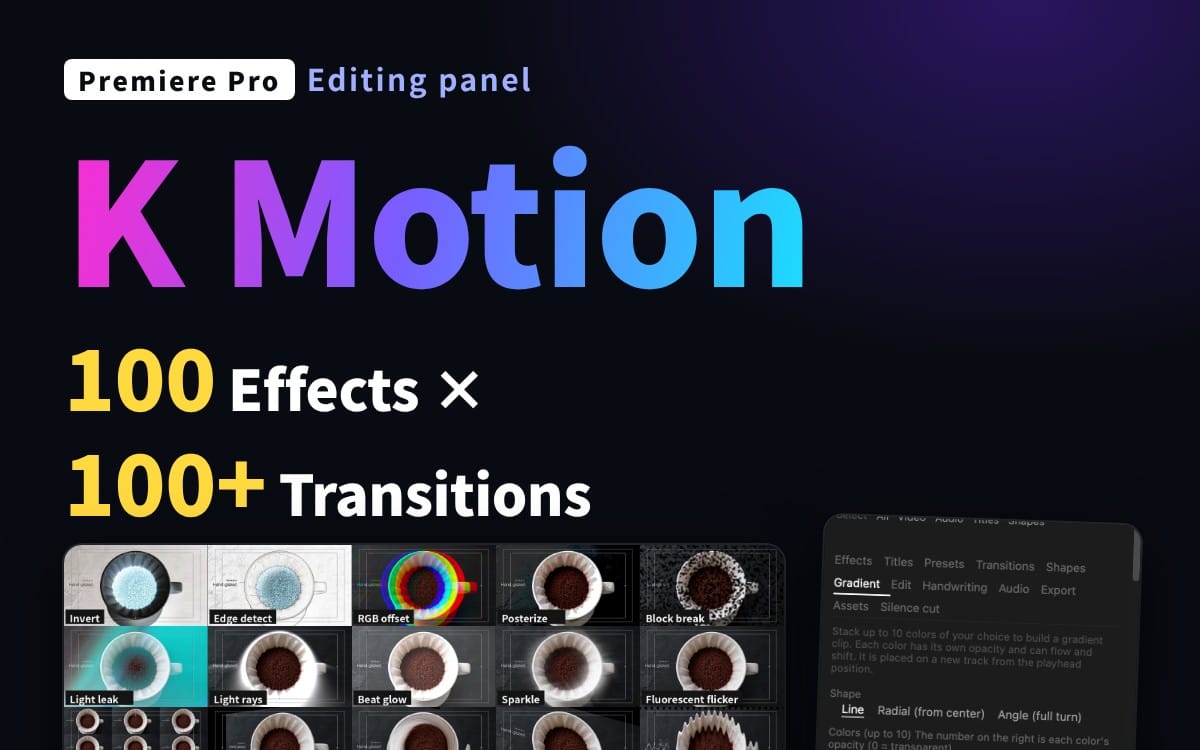
K Motion is a Premiere Pro panel that adds polished motion to your clips in one click and lets you fine-tune it with sliders. Select clips, click a motion, adjust the strength. That's it.
This is the Complete edition. (Pro adds handwriting, export, sound effects, audio tools, beat sync and an asset maker.)
What you get
100 effects (247 adjustable parameters): zoom, slide, bounce, shake, blur, glitch, glow, color looks and more
100+ transitions, added to the start, the end or both of a clip
75 title animations + speech-bubble emotions for text clips: in, out and emphasis
76 one-click presets, plus save your own
Gradient maker: stack up to 10 colors, animate them, delete with one click
Shapes: animated circles, stars and more placed on new tracks
Stackable layers: combine several motions on one clip and tune each one
Copy / paste your effect stack between clips
Works on many clips at once
Search by name or keyword (English and Japanese keywords both work)
Which edition?
Lite: 10 basic motions
Complete: effects, transitions, titles, presets, gradients, shapes, edit tools
Pro: everything in Complete plus handwriting, multi-size export, 45+ sound effects, audio tools, beat sync, asset maker
Requirements
Premiere Pro 25.6 or later (UXP-enabled), 26.x recommended
Tested on Premiere Pro 26.3.2 / macOS. Windows is not verified yet: it should work, but please try Lite first if unsure.
Some effects depend on the built-in effects of your Premiere version; unavailable ones are hidden automatically.
How to install
Double-click the included .ccx file, click Install in Creative Cloud, restart Premiere Pro, then open Window > UXP Plugins > K Motion. A step-by-step guide (README) is included.
License
Personal and commercial use OK, including client work. Redistribution, resale and file sharing are not allowed.
Notes
This is a tool that operates Premiere Pro's built-in effects. No third-party footage or effects are included. Premiere's own undo needs two presses per applied effect; use the panel's Undo for a one-step undo. Not affiliated with or endorsed by Adobe. Adobe and Premiere Pro are trademarks of Adobe Inc.
Ce que vous recevez
1 fichier · 104.09 KB
- KMotion_Complete_EN_v1.0.zipZIP · 104.09 KB
Presets Premiere Pro
K Motion for Premiere Pro — 100 Effects, 100+ Transitions & 75 Title Animations in One Panel
Cette annonce est affichée dans sa langue d'origine (anglais).
Stack motion and effects on your clips with sliders. No keyframing. Works with Premiere Pro built-in effects. Complete edition.
Questions fréquentes
Ai-je accès au produit immédiatement ?
Oui. C'est un produit numérique : vous pouvez le télécharger juste après le paiement, directement depuis votre bibliothèque.
Puis-je l'utiliser pour des projets commerciaux ?
Oui. Les travaux commerciaux et pour des clients sont tous deux autorisés, y compris les produits à ventes illimitées. Vous ne pouvez pas revendre le fichier lui-même.
Quelle est votre politique de remboursement ?
Vous pouvez demander un remboursement dans un délai de 30 jours. Si quelque chose ne va pas, demandez-le depuis votre commande et l'équipe Getly l'examine.
Quels formats et quelles tailles de fichier vais-je recevoir ?
Vous téléchargerez 1 fichier - ZIP - 104.09 KB au total.
Ai-je droit aux mises à jour gratuites ?
Oui : quand le vendeur publie une nouvelle version, vous pouvez retélécharger les derniers fichiers depuis votre bibliothèque sans frais. Consultez le journal des modifications pour les dernières mises à jour.
Prix
$29.00