 Getly
Пресеты Premiere Pro
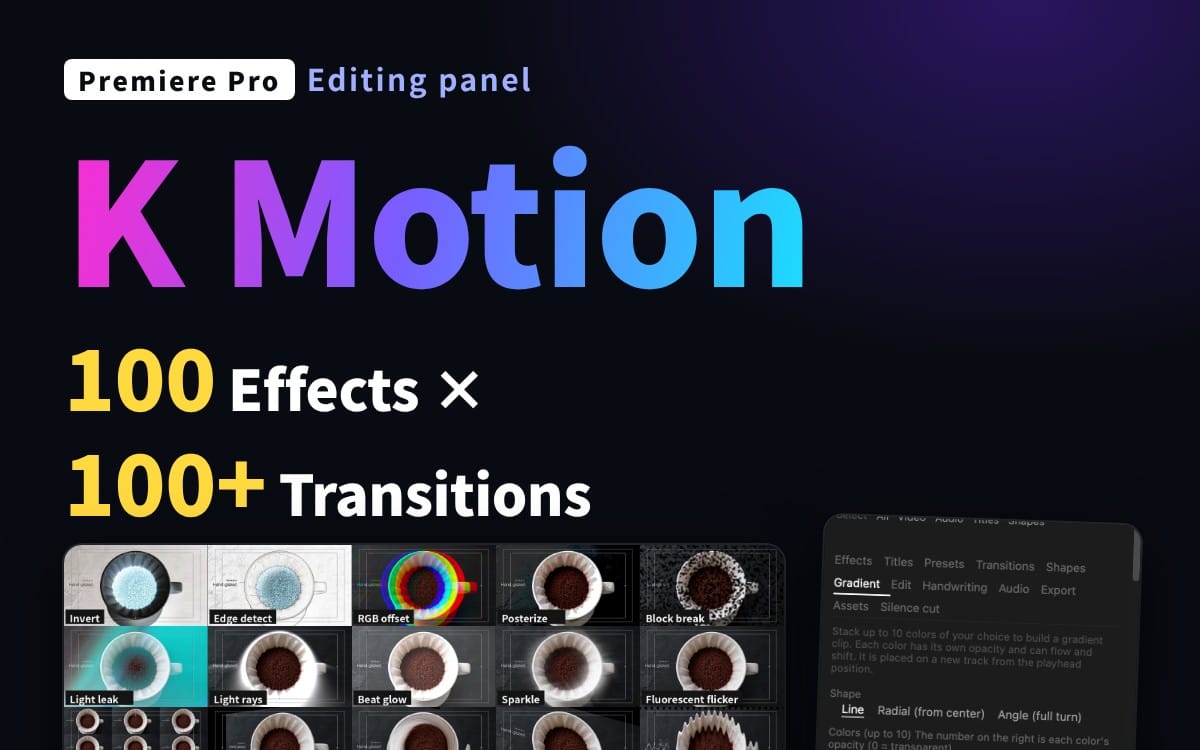
K Motion для Premiere Pro — 100 эффектов, 100+ переходов и 75 анимаций заголовков в одном панели
Сглаживайте движение и эффекты на ваших клипах с помощью ползунков. Без ключевых кадров. Работает с встроенными эффектами Premiere Pro. Полная редакция.
Что вы получите: 1 файл · 104.09 KB · ZIP
Варианты покупкиПревью
Описание товара
Stop keyframing. Start stacking.
K Motion is a Premiere Pro panel that adds polished motion to your clips in one click and lets you fine-tune it with sliders. Select clips, click a motion, adjust the strength. That's it.
This is the Complete edition. (Pro adds handwriting, export, sound effects, audio tools, beat sync and an asset maker.)
What you get
100 effects (247 adjustable parameters): zoom, slide, bounce, shake, blur, glitch, glow, color looks and more
100+ transitions, added to the start, the end or both of a clip
75 title animations + speech-bubble emotions for text clips: in, out and emphasis
76 one-click presets, plus save your own
Gradient maker: stack up to 10 colors, animate them, delete with one click
Shapes: animated circles, stars and more placed on new tracks
Stackable layers: combine several motions on one clip and tune each one
Copy / paste your effect stack between clips
Works on many clips at once
Search by name or keyword (English and Japanese keywords both work)
Which edition?
Lite: 10 basic motions
Complete: effects, transitions, titles, presets, gradients, shapes, edit tools
Pro: everything in Complete plus handwriting, multi-size export, 45+ sound effects, audio tools, beat sync, asset maker
Requirements
Premiere Pro 25.6 or later (UXP-enabled), 26.x recommended
Tested on Premiere Pro 26.3.2 / macOS. Windows is not verified yet: it should work, but please try Lite first if unsure.
Some effects depend on the built-in effects of your Premiere version; unavailable ones are hidden automatically.
How to install
Double-click the included .ccx file, click Install in Creative Cloud, restart Premiere Pro, then open Window > UXP Plugins > K Motion. A step-by-step guide (README) is included.
License
Personal and commercial use OK, including client work. Redistribution, resale and file sharing are not allowed.
Notes
This is a tool that operates Premiere Pro's built-in effects. No third-party footage or effects are included. Premiere's own undo needs two presses per applied effect; use the panel's Undo for a one-step undo. Not affiliated with or endorsed by Adobe. Adobe and Premiere Pro are trademarks of Adobe Inc.
Что вы получите
1 файл · 104.09 KB
- KMotion_Complete_EN_v1.0.zipZIP · 104.09 KB
Пресеты Premiere Pro
K Motion для Premiere Pro — 100 эффектов, 100+ переходов и 75 анимаций заголовков в одном панели
Сглаживайте движение и эффекты на ваших клипах с помощью ползунков. Без ключевых кадров. Работает с встроенными эффектами Premiere Pro. Полная редакция.
Частые вопросы
Доступ открывается сразу?
Да. Это цифровой товар - скачать его можно сразу после оплаты, прямо из своей библиотеки.
Можно ли использовать в коммерческих проектах?
Да. Разрешены и коммерческое использование, и работа для клиентов, включая продукты без ограничения тиража. Перепродавать сам файл нельзя.
Какие условия возврата?
Запросить возврат можно в течение 30 дней. Если что-то не так, оформите заявку в своём заказе - её рассмотрит команда Getly.
Какие форматы и размеры файлов я получу?
Вы скачаете 1 файл - ZIP - всего 104.09 KB.
Обновления бесплатны?
Да - когда продавец выпускает новую версию, вы можете бесплатно скачать актуальные файлы из своей библиотеки. Последние изменения смотрите в истории версий.
Цена
$29.00