Getly
ШІ-інструменти та скрипти
CSV & Excel File Merger - Python Automation | Merge, Clean & Deduplicate
Це оголошення показано мовою оригіналу (англійська).
Merge recurring CSV, XLSX and XLSM exports into one clean dataset with source tracking, schema controls, duplicate removal, and Excel reporting.
Що ви отримаєте: 1 файл · 70.24 KB · ZIP
Переглянути варіанти купівліОпис товару
Stop repeating the same spreadsheet cleanup work every week.
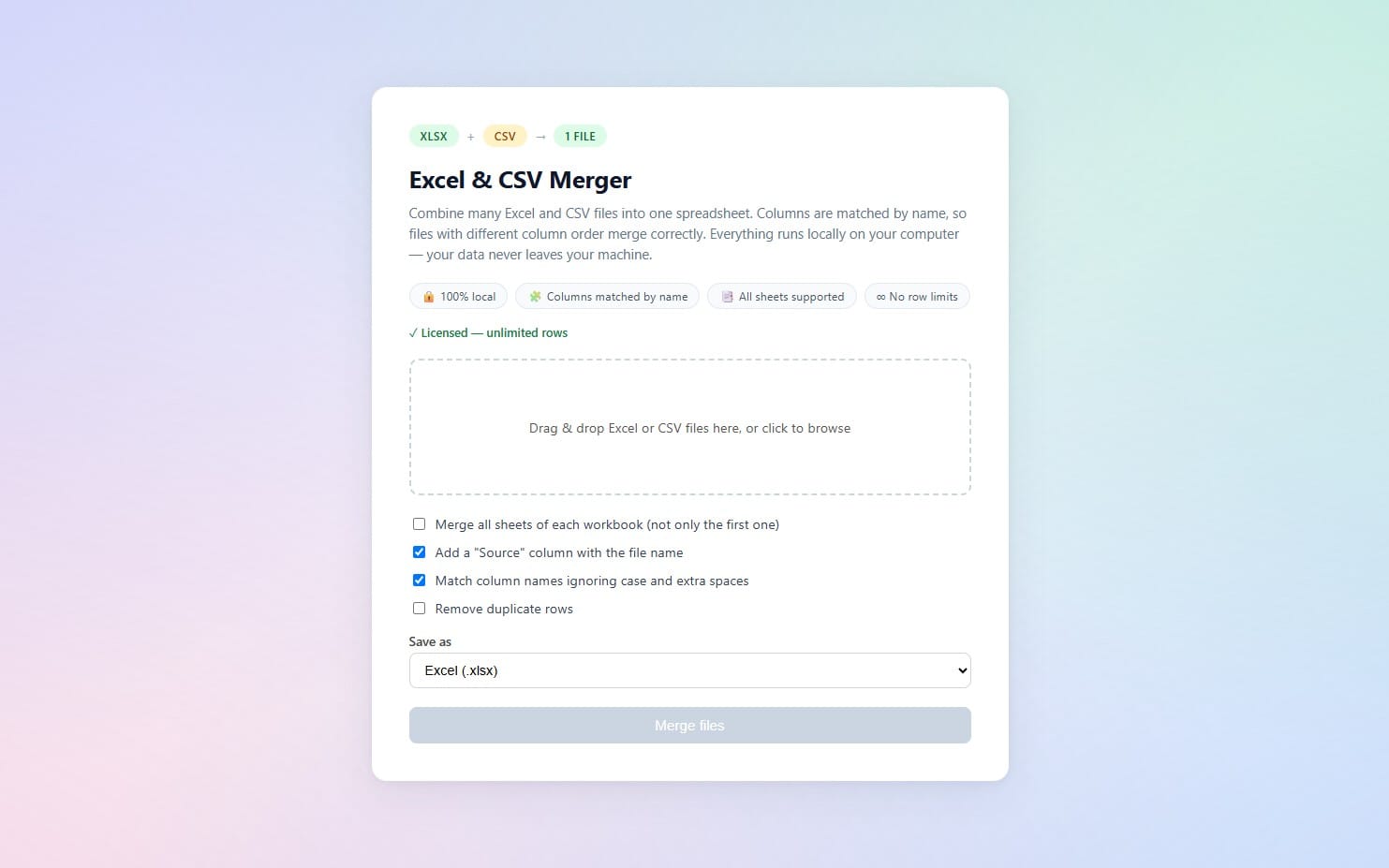
CSV & Excel File Merger is a lightweight Python automation for freelancers, analysts, operators, and small businesses that regularly receive CSV or Excel exports from different sources.
Merge multiple files into one clean dataset, track where each row came from, handle different column structures, remove duplicate rows, and export a clean Excel or CSV result.
WHAT YOU GET
• Python automation script
• Windows launcher
• macOS launcher
• CSV, XLSX and XLSM input support
• Union schema mode
• Strict schema mode
• Automatic header cleaning
• Empty row and column cleanup
• Source File tracking
• Source Sheet tracking
• Duplicate-row removal
• Excel output with Merged Data and Merge Summary sheets
• CSV output
• JSON audit report
• Sample CSV and Excel files
• Demo output
• Step-by-step PDF guide
• Troubleshooting notes
• Security notes
HOW IT WORKS
1. Put the CSV or Excel files you want to merge into the input folder.
2. Choose the merge mode.
3. Run the included script or launcher.
4. The tool reads the supported files and normalizes their structure.
5. The merged dataset is written to the output folder.
6. An audit report records the operation.
MERGE MODES
Union Mode
Combines files even when their columns are not identical. Missing values are left blank and the available columns are preserved.
Strict Mode
Checks that the input files use the same column structure before merging.
DEDUPLICATION
Use the deduplication option to remove duplicate rows based on the actual dataset values.
Source File and Source Sheet information remain available so you can trace where records came from.
WHAT YOU CAN USE IT FOR
• Combining monthly CSV exports
• Merging supplier spreadsheets
• Consolidating freelance client data
• Combining sales reports
• Cleaning recurring Excel exports
• Preparing datasets for analysis
• Building repeatable spreadsheet workflows
REQUIREMENTS
• Python 3.11 or newer
• Windows, macOS, or Linux
• Basic command-line familiarity recommended
The included Windows and macOS launchers reduce the setup work.
No paid API or external service is required for the core file-merging workflow.
OUTPUT
The Excel output contains:
• Merged Data — the combined dataset
• Merge Summary — file counts, row counts and processing information
A CSV output and JSON audit report can also be generated.
IMPORTANT
This is a downloadable local automation tool, not a hosted web application.
The tool processes the files on your own computer.
Do not process confidential or regulated information unless your own security and compliance requirements allow it.
SUPPORTED FILES
• .csv
• .xlsx
• .xlsm
NOT INCLUDED
• Microsoft Excel
• Paid cloud storage
• Hosted automation
• Ongoing technical support
• Custom development for your specific workflow
LICENSE
Commercial use is allowed for your own business and client projects.
You may modify the scripts for your own workflows.
You may not resell, redistribute, sublicense, or repackage the original files as a competing product.
DELIVERY
You receive the complete digital toolkit as an instant downloadable ZIP after purchase.
The ZIP contains the automation, documentation, sample files, and supporting materials.
REFUNDS
Please review the included files, requirements, supported formats, and description before purchasing. Getly's platform refund policy applies to the listing.
Що ви отримаєте
1 файл · 70.24 KB
- SOFLMARKET_CSV_Excel_File_Merger.zipZIP · 70.24 KB
ШІ-інструменти та скрипти
CSV & Excel File Merger - Python Automation | Merge, Clean & Deduplicate
Це оголошення показано мовою оригіналу (англійська).
Merge recurring CSV, XLSX and XLSM exports into one clean dataset with source tracking, schema controls, duplicate removal, and Excel reporting.
Входить до Getly ProОтримати Pro
Теги
Поширені запитання
Чи отримаю я доступ одразу?
Так. Це цифровий товар: ви можете завантажити його одразу після оплати, просто зі своєї бібліотеки.
Чи можна використовувати його в комерційних проєктах?
Так. Дозволено і комерційну роботу, і роботу для клієнтів, зокрема товари без обмеження продажів. Ви не можете перепродавати сам файл.
Яка у вас політика повернення коштів?
Ви можете запросити повернення коштів протягом 30 дн. Якщо щось не так, подайте запит зі свого замовлення, і команда Getly його розгляне.
Які формати та розміри файлів я отримаю?
Ви завантажите 1 файл - ZIP - загалом 70.24 KB.
Чи отримую я безкоштовні оновлення?
Так: коли продавець випускає нову версію, ви можете повторно завантажити свіжі файли зі своєї бібліотеки безкоштовно. Останні оновлення дивіться в журналі змін.
Ціна
$6.99