Ассеты и плагины Unity
Studio 3D Import/Export — Complete Asset Pipeline
All-in-one 3D pipeline: import/export 6 formats (FBX, OBJ, glTF, GLB, DAE, STL), mesh optimizer with LOD generation, PBR auto-setup, model validator with auto-fix, batch processing & 15+ editor tools.
Описание товара
★ STUDIO 3D IMPORT/EXPORT — COMPLETE ASSET PIPELINE ★
The ultimate 3D model management toolkit for Unity. Import, optimize, validate, and export — all from one unified interface.
━━━━━━━━━━━━━━━━━━━━━━━━━━━━━━━━━
🔷 IMPORT & EXPORT — 6 FORMATS
━━━━━━━━━━━━━━━━━━━━━━━━━━━━━━━━━
• FBX — Full Autodesk support (via Unity FBX Exporter)
• OBJ — Wavefront with MTL materials
• glTF 2.0 / GLB — Web-ready, PBR materials included
• Collada DAE — Industry-standard XML exchange
• STL — 3D printing ready
• PLY — Point cloud with vertex colors
Drag & drop models directly into the editor. Configure scale, normals, materials, textures, and animations — all in one window.
━━━━━━━━━━━━━━━━━━━━━━━━━━━━━━━━━
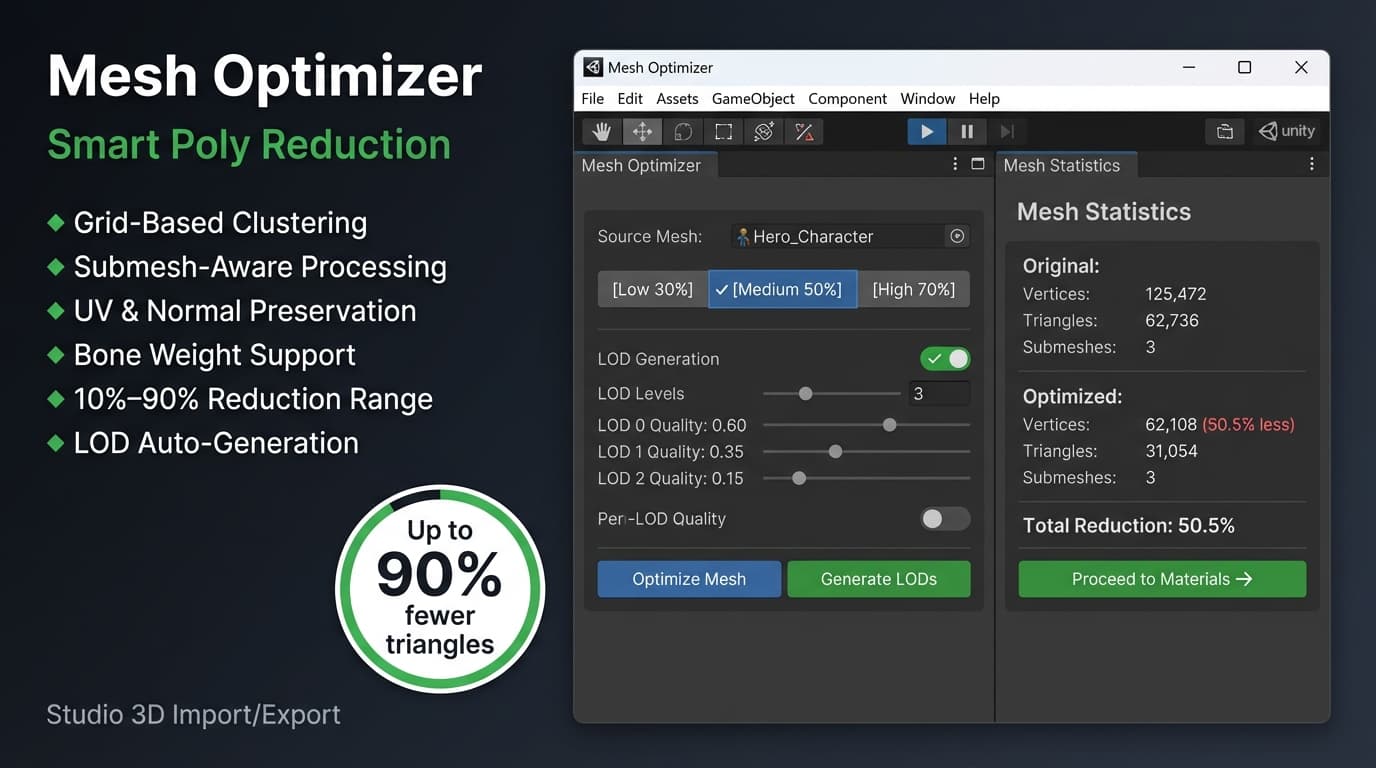
⚡ MESH OPTIMIZER — UP TO 90% REDUCTION
━━━━━━━━━━━━━━━━━━━━━━━━━━━━━━━━━
• Grid-based vertex clustering algorithm
• Submesh-aware processing — no meshes disappear
• Preserves UVs, normals, tangents, bone weights, and vertex colors
• Preset levels: Low (30%), Medium (50%), High (70%), Custom
• Real-time before/after statistics
━━━━━━━━━━━━━━━━━━━━━━━━━━━━━━━━━
🏔️ AUTOMATIC LOD GENERATION
━━━━━━━━━━━━━━━━━━━━━━━━━━━━━━━━━
• Generate 1–4 LOD levels with one click
• Per-level quality control (5%–80%)
• Multi-mesh safe — handles complex objects with multiple submeshes
• Adaptive grid sizing based on mesh bounds
• Automatic LODGroup component setup
• Supports both static and skinned meshes
• Preserves blend shapes and bone bindings
━━━━━━━━━━━━━━━━━━━━━━━━━━━━━━━━━
🎨 MATERIAL & TEXTURE MANAGER
━━━━━━━━━━━━━━━━━━━━━━━━━━━━━━━━━
• PBR Auto-Setup — detects albedo, normal, metallic, roughness, _ao naming patterns
• 64×64 texture thumbnail previews per slot
• Batch material conversion (any shader → Standard/URP/HDRP)
• Smart texture discovery with fuzzy matching (Levenshtein distance)
• Fix missing textures in one click
• Texture optimization: compression, max size, mipmaps, streaming
━━━━━━━━━━━━━━━━━━━━━━━━━━━━━━━━━
✅ MODEL VALIDATOR & AUTO-FIX
━━━━━━━━━━━━━━━━━━━━━━━━━━━━━━━━━
• 8 validation categories: Materials, Textures, Meshes, Naming, Scale, Animations, Lightmaps, Colliders
• Color-coded issues: Errors (red), Warnings (orange), Info (blue)
• One-click Auto-Fix for most common problems
• Export detailed validation reports
• Configurable thresholds (max vertices, max texture size, UV padding)
━━━━━━━━━━━━━━━━━━━━━━━━━━━━━━━━━
🔄 FORMAT CONVERTER
━━━━━━━━━━━━━━━━━━━━━━━━━━━━━━━━━
• Convert between any supported format
• Drag & drop source files or add from selection
• Preserve hierarchy, materials, and textures
• Batch conversion with progress tracking
• Per-file success/error reporting
━━━━━━━━━━━━━━━━━━━━━━━━━━━━━━━━━
📊 MESH ANALYSIS DASHBOARD
━━━━━━━━━━━━━━━━━━━━━━━━━━━━━━━━━
• Vertex budget tracking with visual progress bar
• Per-mesh breakdown table (vertices, triangles, UVs, normals, tangents, colors, blend shapes)
• Bounding box visualization
• Draw call estimation
• Intelligent optimization hints
━━━━━━━━━━━━━━━━━━━━━━━━━━━━━━━━━
📁 MODEL BROWSER
━━━━━━━━━━━━━━━━━━━━━━━━━━━━━━━━━
• Visual grid and list view modes
• Cached 3D thumbnails for instant browsing
• Search, filter, and sort by name/size/date/vertices
• Side preview panel with full statistics
• Quick actions: open in importer, convert format, select in project
━━━━━━━━━━━━━━━━━━━━━━━━━━━━━━━━━
🎬 ANIMATION PROCESSOR
━━━━━━━━━━━━━━━━━━━━━━━━━━━━━━━━━
• Humanoid animation retargeting between different skeletons
• Automatic bone mapping with Levenshtein distance matching
• Animation settings: loop, mirror, root motion
• Batch processing for multiple clips
• Real-time playback preview
━━━━━━━━━━━━━━━━━━━━━━━━━━━━━━━━━
🔧 WORKFLOW MANAGER — 5-STEP PIPELINE
━━━━━━━━━━━━━━━━━━━━━━━━━━━━━━━━━
1️⃣ Import & Preview
2️⃣ Validate Model
3️⃣ Optimize Mesh + Generate LODs
4️⃣ PBR Material Auto-Setup
5️⃣ Multi-Format Export
Auto-advance mode, per-step validation, before/after previews. Never miss a step in your pipeline.
━━━━━━━━━━━━━━━━━━━━━━━━━━━━━━━━━
📦 BATCH PROCESSING
━━━━━━━━━━━━━━━━━━━━━━━━━━━━━━━━━
• Import or export hundreds of models at once
• Shared settings across all files
• Real-time progress tracking with per-file status
• Error recovery — failed files don't stop the queue
• Complete summary with success/fail counts
━━━━━━━━━━━━━━━━━━━━━━━━━━━━━━━━━
⚙️ ADDITIONAL FEATURES
━━━━━━━━━━━━━━━━━━━━━━━━━━━━━━━━━
• Pre-import preview — see models before importing into your project
• Import/export preset system — save and load configurations
• Render pipeline auto-detection (Standard, URP, HDRP)
• FBX Exporter package auto-detection
• Comprehensive Settings panel with performance tuning
• Dark theme UI integrated seamlessly into Unity Editor